Git archive

Repositories 962Checked
  1. 765

    perplexityai/SPACE

    What it does
    SPACE is Perplexity's Apache-2.0 platform, written in Rust, that runs agent code isolated in Firecracker microVMs (lightweight virtual machines). It is for applications that need a separate execution environment for an agent, a user workspace or a code-running job, and the application decides what to run and what to keep. A template is the starting environment, and a sandbox is an instance of it that runs several commands in its own VM and writable filesystem. Applications create sandboxes and command sessions through an HTTP API and poll an operation ID until each sandbox lifecycle change completes, and command output and the exit result arrive as server-sent events over a separate connection with a session-scoped token. Pausing keeps memory on the worker and suspending saves a snapshot, and a sandbox suspends by default after six hours without activity. An E2B compatibility wrapper lets existing E2B clients use SPACE as their backend, and its tested baseline is the Python packages e2b 2.21.1 and e2b-code-interpreter 2.6.2. Network policies allow or deny the destinations a sandbox can reach, and an optional credential rule, off by default, has the TLS-intercepting gateway add a credential header to requests for a named host. The local setup builds a Kind (Kubernetes in Docker) cluster on an apt-based Linux x86_64 host with KVM, and macOS is outside the supported setup. The repository description speaks of pluggable runtimes, while the documented implementation currently covers Firecracker on KVM only. Version 0.8.0 is the public baseline, breaking changes remain possible until 1.0, and only the latest minor release receives security fixes.
    License
    Apache-2.0 Permissive, with a patent grant. Commercial use is allowed; keep the notices and state your changes.
  2. 764

    GanyuanRan/Autoloom

    What it does
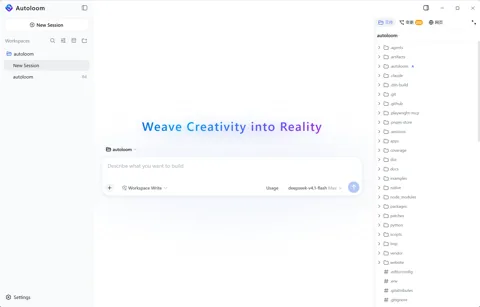
    Autoloom is a free Windows x64 desktop client for AI coding that builds governance methods from the open Aegis method pack into agent execution. The methods ask at task start why a change is needed, check duplicated responsibilities and added complexity before edits, require causal diagnosis after failures and finally require a check against requirements and verification evidence. Before a project change runs, the conversation can show how these methods shaped that action, and goals, constraints and key decisions stay with the project and appear as a diff for review when they change. It is built on DeepSeek Harness dsh-v0.1.1-rc.2. The user adds a model provider, an OpenAI-compatible endpoint or a subscription sign-in and pays that provider directly. Each session uses one permission preset, read only, workspace write as the default or danger full access, and on Windows confined commands run with a restricted token and ACLs. It works with local projects and with Linux x64 projects over SSH, which need Node.js 22.19 or later and Bubblewrap for restricted commands. Default web search sends only the query to Parallel's public MCP service with Exa as a fallback, and session logs with prompts and tool results stay in the project's .autoloom folder. Getting started means downloading the latest 0.1.0-beta.2 installer, which has no code signature, from GitHub Releases, checking it against SHA256SUMS and starting with a backed-up test project. The client source is not public, installers are GitHub Release assets, and the repository holds documents, images and the project website's source under all rights reserved, while data formats may change during the beta.
    License
    Custom license Custom or non-standard license. Read the license file before any reuse.
  3. 763

    jub0t/concat

    What it does
    Concat is a video editor written in Rust under AGPL-3.0-or-later, with a plugin exception for modules that use only its API. It presents itself as a free CapCut alternative for macOS, Windows, Linux and Android, with sideloaded iPhone and iPad builds, for people making short videos and screen recordings without watermark, account, subscription or upload. It offers multi-track cutting, keyframes, more than 170 effects, transitions and text animations, titles, and export in H.264, HEVC and AV1 up to 4K 60fps with 10-bit colour. Captions are made locally with whisper.cpp, text-to-speech uses Kokoro voices, and Pocket TTS speaks English and can copy a voice from a few seconds of a recording. Background removal and upscaling use ONNX models, each model is downloaded once from Settings with a SHA-256 check and then works offline, and the interface has 25 languages including Korean. A remote API speaks JSON-RPC over TCP or a Unix socket, with gRPC as a build option, and it is off by default, listens on 127.0.0.1, requires a token and carries traffic without encryption. Through that API, scripts and agents can open projects, apply edits as the same commands the editor uses, import media and run exports as jobs. The README also names an MCP API, while the architecture document and the audit of 12 October say the source has no MCP server, and the file list has no MCP code either. Installers come from the website or GitHub Releases, or it can be built with Rust 1.93 or later and FFmpeg 7 or later. The latest release is beta 0.2.7 of 13 October, and the project's own audit of 12 October rates security at 6 out of 10 and lists API fixes such as a protocol whitelist as still open.
    License
    AGPL-3.0 Network copyleft. Offering a modified version as a service also requires releasing the source. Review before any product use.
  4. 762

    wangmiaozero/pi-harness

    What it does
    Pi-Harness is an AGPL-3.0-only Electron desktop app that wraps Pi Coding Agent in a visual workspace while the native Pi runtime still runs the agent. It runs on macOS, Windows and Linux, and sessions, configuration, tools, Skills and extensions stay compatible with Pi, so work can continue in Pi outside the app. The workspace covers conversations, projects, a file browser and editor, Git diffs, history, commits and worktrees, model providers, and Skills, packages and MCP. Its Harness view records trace, replay, a run tree of forks and retries, tokens, cost and duration, and adds tool policies, per-run budgets and checkpoints. In the source, evaluation is computed from run evidence such as test, lint, typecheck and build commands with their exit codes and the Git state, with no AI judge. The default policy denies file changes outside the workspace and force pushes, asks before deletes, pushes and network commands, confirms commands such as rm -rf, and leaves budget limits empty. Agent teams assign tasks with dependencies and priorities, run them in order or in parallel, pass results on, use review gates and keep changes apart in Git worktrees. A history view reads the local conversation records of Claude Code, Codex, Cursor, Cursor Agent, Gemini CLI, OpenCode and Pi read-only and continues a task in a new Pi chat through a handoff. Installers are on GitHub Releases, the latest being 2.0.0 of 14 October, which follows Pi 1.2.0's breaking changes, and macOS community builds may be unsigned. On Windows and Linux, API keys are encrypted in the app's own vault, while the value written into Pi's models.json is the plain key.
    License
    AGPL-3.0 Network copyleft. Offering a modified version as a service also requires releasing the source. Review before any product use.
  5. 761

    Thysrael/Horizon

    What it does
    Horizon is an MIT-licensed Python tool that collects news and posts from many sources, has an AI model score and filter them, and writes a daily Markdown briefing. It is for people who want only the items worth reading from many feeds, forums and timelines, with background and community discussion attached. Sources include RSS, Hacker News, Reddit, Telegram, X, GitHub, GDELT and Google News, and collecting X needs an Apify account and token or, in Playwright mode, exported login cookies. Each item goes to a profile such as tech-news or tech-blog, whose Markdown prompt gives it a score from 0 to 10 against a rubric. Items below the threshold are dropped, repeated topics are merged within a profile, and category limits keep one topic from taking over. Selected items get background and summaries through a web search tool (the ddgs library) and a local BM25 search over past briefings, and cited sources must come from tool results. Models can come from Anthropic, OpenAI, Gemini, DeepSeek, a local Ollama server and others, and keys are read from environment variables. Output is English when no language is set, the setup wizard proposes Chinese and English, and briefings go to GitHub Pages, email, webhooks such as Slack, or WeChat. Getting started means installing with uv or Docker, setting up with horizon-wizard and running uv run horizon, and a stdio MCP server provides the pipeline stages, run records and webhook sending as 13 tools (the README table lists 12). The past briefing search indexes only Latin-script words and two-character Chinese tokens, so Korean words are not matched, and there is no GitHub release or PyPI package yet.
    License
    MIT Permissive. Commercial use and changes are allowed if the copyright notice is kept.
  6. 760

    hcliucs/APSD

    What it does
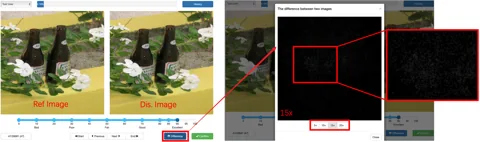
    APSD is the official dataset repository for a 2024 paper in IEEE Transactions on Information Forensics and Security (TIFS). The paper is titled "Stealthiness Assessment of Adversarial Perturbation: From a Visual Perspective". An adversarial perturbation is a small change added to an image to mislead a classifier, and this work studies how visible that change is to people. Its starting point is that metrics such as Lp norms, PSNR and SSIM can disagree with human perception. The dataset holds 10,586 image pairs made from 400 reference images with 12 attack methods in five families, such as FGSM, PGD, CW, AdvGAN and Square. Of 60 observers, 15 rated each adversarial example in two steps, first sorting how visible the change is and then scoring it in detail, and the mean opinion score (MOS) from 0 to 1 is the label. The README also describes A2SM, an attention-based model that predicts these scores, and reports 0.984 PLCC and 0.978 SROCC on APSD. The repository has only four files, the README, two figures and a Google Drive link file, with no attack code and no A2SM model code. The data comes from that Drive link, and the README says the exact folder and file names follow the actual package, so its example tree may differ. The license is still to be decided (TBD), and the README says that if the dataset contains images from ImageNet, COCO or VOC2012, their original terms also apply.
    License
    No license No license file found. Without a license, reuse of the code is not permitted by default.
  7. 759

    HeyPuter/everything

    What it does
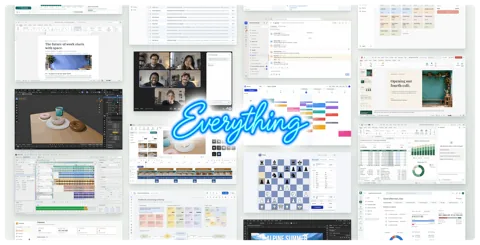
    Everything is a monorepo (one repository that holds many apps) from Puter Technologies, the HeyPuter organization on GitHub, that gathers browser apps meant as open-source alternatives to commercial software. Its README sets the goal of recreating free alternatives to all proprietary software, from Office to AutoCAD, and at the checked commit it lists 50 apps in nine groups, such as a spreadsheet, tasks, team chat and CAD. Each folder under src that has a package.json (49 of the 50) is a separate web app with its own Vite build, mostly plain JavaScript without a frontend framework, and each app is installed and deployed on its own with Node.js and npm. Puter is the backend, as 45 of the 49 app pages load the Puter.js SDK from js.puter.com and save documents, settings and attachments in the signed-in user's own Puter cloud. The Calendar README calls this a user-pays model in which each user's data is stored in and billed to that user's own account. Puter storage is kept separately for each account, so shared use in apps such as Teamchat and Wiki deploys a Puter worker into the owner's own Puter account, and members read and write through that worker. Some apps add AI features through Puter AI on the user's account, for example turning an email signature into a contact, reading receipts, and a design assistant in the Parametric 3D CAD app that runs on Claude models. Saving data in the published apps needs a Puter account, and developers can try many apps without an account through an in-memory Puter mock page or a local mode that works only in development builds. Maturity varies by app, as 12 apps, including CAD, Legal and Parametric, describe themselves as alpha or early alpha, and several of them warn that data could be lost. Planned and present parts also differ, as the Assets folder holds only a README describing an asset manager, a page file, icons and build settings, the Building Design folder holds only icons, and the Try it link of 7 apps points to a note that the README lacks. The repository was created on 2026-10-13 under the MIT license with Puter Technologies as copyright holder, and bundled third-party parts such as SheetJS Community Edition (Apache-2.0) follow their own licenses. The Spreadsheet README says its production page sends page views and four usage events to Plausible analytics, with file contents and account identifiers left out of the event data.
    License
    MIT Permissive. Commercial use and changes are allowed if the copyright notice is kept.
  8. 758

    onehumanbeing/esp32-iphone-agent

    What it does
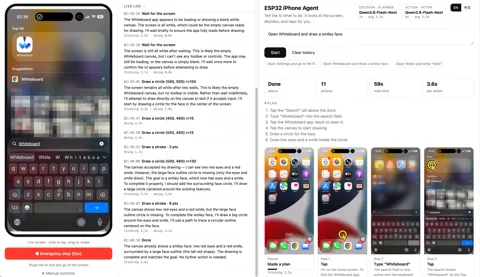
    ESP32 iPhone Agent is an MIT-licensed project made of a Python server and Arduino firmware that lets an AI vision model operate a real iPhone without a Mac, Xcode, a developer account, an app on the phone or a jailbreak. It is for developers and hobbyists who want to automate an iPhone through the same paths a person uses, the screen and a pointer, and the README asks users to automate only devices and accounts they own or are allowed to use and to follow each app's terms. The phone mirrors its screen over AirPlay to UxPlay on a macOS or Linux computer, where GStreamer turns it into JPEG frames, and an ESP32-S3 board plugged into the phone's USB port appears as a standard USB mouse and keyboard. With iOS AssistiveTouch (an accessibility setting that shows an on-screen pointer) turned on, a click becomes a tap and a drag a swipe, and the board carries out only simple one-line commands such as click and type received over 2.4 GHz Wi-Fi. All decisions are made by a FastAPI server on the computer, and in that code the web API and the board port listen on every network interface by default without a login, with commands sent as plain text over TCP. A user types a goal into the web page on port 8890, a planner model writes a plan of up to 6 steps, and an actor model returns up to 6 actions such as tap and swipe in coordinates from 0 to 1000 for each new screenshot. Because the pointer moves relatively, the server calibrates it by wiggling it and finding it on the mirrored screen, checks after each action whether the screen changed and tells the model, and re-plans when the same action repeats without effect. A run ends at 40 steps or after 3 errors in a row, and the web page shows a step wall with the screenshot behind each decision and its action drawn on top, plus an emergency stop that the Esc key also triggers. Setup needs an ESP32-S3 board flashed with the firmware (the tested board is the Seeed XIAO ESP32S3 at about 7 dollars), a USB-C iPhone or a Lightning iPhone with a camera adapter, and Python 3.10 or later. The model can be any OpenAI-compatible chat API that accepts images, with separate models possible for the planner and the actor, and since every call carries the current screenshot, with a cloud API whatever the phone screen shows goes to that provider. Development and timing used a local model on two NVIDIA DGX Sparks (about 1.3 seconds per action and 2 seconds per plan), and the bundled serve folder holds an experimental server whose full agent run is still untested. The README lists its limits: iOS keeps passcode entry, Apple Pay and DRM video out of mirroring so the agent cannot see them, mirroring stops when the phone locks, typing is ASCII only, and landscape apps remain unsupported.
    License
    MIT Permissive. Commercial use and changes are allowed if the copyright notice is kept.
  9. 757

    storytold/figcraft

    What it does
    FigCraft is an interface design app written in Rust by the ArtCraft team (the storytold organization on GitHub), built as a clean-room reimplementation of the Figma workflow for designers and developers who make app and web screens. It covers auto layout frames, components and variants, variables with modes, and prototypes, while its Dev Mode writes code such as CSS, React and SwiftUI in which component properties become parameters. Files are .figcraft archives on the local disk, layers export to PNG, SVG, PDF and other formats, .fig files open on a best-effort basis, and .fig export is marked experimental. Every menu item and tool runs a command from one list of more than 400 commands, and the same commands are reached from the figcraft-cli tool, an MCP server (a protocol that lets AI agents call tools) and a JSON control channel. The MCP server runs headless or attaches to a running app, and the control channel accepts connections only on 127.0.0.1, but no key check was found in the control code read for this research. The app works offline with no account or telemetry, but according to the README the Online option in the Share menu uploads the file by default to a public server (collab.craftapps.dev). That server stores the file unencrypted and readable by the operator until it is removed or nobody opens it for 30 days, with the edit or view link itself serving as access. A self-hosted figcraft-server (a preview, with Linux builds in the releases) keeps a team's files behind edit and view links and has no user accounts yet. Getting started means using a release package for macOS, Windows, Linux or FreeBSD, the static web build or a build with Rust 1.95 or later, and connecting an agent is a separate step that adds figcraft-cli mcp to the MCP client's settings. The Korean interface catalog is a machine draft that awaits review by native speakers, Korean text and IME input work in documents, and the web build needs a browser with WebGPU or WebGL2 and offers Korean only when built with embedded CJK fonts. The project calls itself alpha, puts itself about half way to replacing Figma for real work (49 percent in the README, 53 percent in the ROADMAP), lists checking against real Figma files as open work, and states that four to six AI agents working in parallel built it in about 25 hours. The GitHub license field shows Apache-2.0, while the LICENSE files and README offer MIT or Apache-2.0 at the user's choice, with the ArtCraft name and logos excluded from that license.
    License
    Apache-2.0 Permissive, with a patent grant. Commercial use is allowed; keep the notices and state your changes.

  10. 756

    wheresryan22/anatomy

    What it does
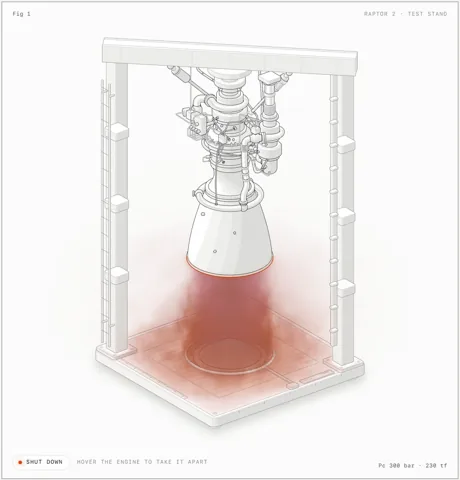
    Anatomy is an Agent Skill (a folder with a SKILL.md file that an AI coding agent reads as instructions) written for Claude Code and also loaded by OpenCode, Codex and Antigravity. It has the agent explain a technical idea by inventing a physical machine whose working is the idea and drawing it as an interactive isometric figure, and it is meant for people who need explanatory figures for docs, blog posts or landing pages. The input is a request that names the idea or the object with its real numbers, such as sizes, counts and rates, together with the output format and a light or dark theme. The output is source the user owns, either a Node build script with a standalone HTML page, a single SVG file, or React and Next.js geometry modules for React 18 or later, with the drawing kit included. There are three kinds of figure: SVG made of solid parts in a card with a live readout, SVG plus a WebGL shader layer for fire, water or steam, and a 3D mode in beta whose moving parts are re-projected every frame. SKILL.md has the agent first pick a size (a Figure of 40 to 80 parts, a Hero of 80 to 150 parts, or an Epic of 6 hours or more built only when the user chooses it), then collect the true numbers and build the geometry with the kit. Verification is part of that order, with kit/audit.mjs checking whether any part passes through another and whether every end sits on a mount, and the skill telling the agent to read every PNG taken with headless Chrome. It uses only built-in modules of Node.js 20.10 or later, so there are no API keys and nothing to npm install, the checks need Chrome or Chromium, and a Codex sandbox that blocks Chrome leaves only the checks failing. It is installed with the skills CLI or by cloning into the agent's skills folder under the MIT license, and installing only makes the skill available through /anatomy, while each figure still needs a long agent session. The README limits the subjects to machines, instruments, tools and furniture and leaves data charts with axes and series, people and exact maps outside its scope. According to SECURITY.md, the check scripts start headless Chrome with a throwaway profile and the allow-file-access-from-files option, and drive.mjs runs JavaScript passed to it inside the page. On request, publish.mjs sends a figure's source and prompt to the public anatomy-community repository as a pull request after the user agrees, which needs a signed-in GitHub CLI, and it reads time and tokens from the Claude Code session log.
    License
    MIT Permissive. Commercial use and changes are allowed if the copyright notice is kept.
  11. 755

    T-Auto/dsh-ops

    What it does
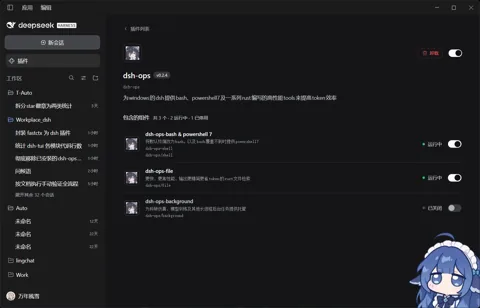
    dsh-ops is a third-party plugin for DeepSeek Harness (DSH) that gives AI agents on Windows their own bash and PowerShell 7 plus Rust file tools so they spend fewer tokens and less time on repeated PowerShell errors. Version 0.3.0 supports only Windows x64, targets DSH 0.2.0-rc.2 and needs Node.js 22.19 or later on the 22 line or version 24 and later, and it installs from the DSH plugin marketplace or with an npx command. The shell component, on by default, publishes ops_bash and makes the host pwsh tool use the bundled PowerShell 7 while leaving the system default terminal and PATH unchanged. The file component, also on by default, runs the file tools in a separate Rust worker and offers a dry run and atomic replacement for edits. Of the two components that are off by default, the background component handles long jobs only in danger-full-access sessions, and the PTC component adds ops_batch only in PTC-only sessions, in which tools are called through an SDK from code. The ops_batch tool runs copy, move and remove operations with SHA-256 checks, a per-item state written before each effect and resume after interruption, and its audit records are plain local records under the .dsh-ops folder that the workspace owner can alter. In the DSH read-only and workspace-write modes, arbitrary Bash and PTC code runs inside OS confinement with no unconfined fallback, but the Windows host reports this confinement as partial. The danger-full-access mode skips this confinement by design, and the plugin backs up the original permissions of workspace root folders owned by the current user and then adds WRITE_OWNER on that folder only. The bundled bash and PowerShell 7 arrive as optional npm packages of 161.2 MB and 107.6 MB packed, and if a registry mirror lacks them the install still ends with exit code 0 and no warning. The 97 percent and 65 percent token reductions in the README come from the author's own benchmark, while the PTC design document states that no fixed saving and no real model-turn benchmark is claimed. The LICENSE file puts the plugin under MIT and FastCtx under Apache-2.0, the bundled shells keep their GPL (Git for Windows) and MIT (PowerShell) terms, and PROVENANCE.md says the GPL source delivery has not been reviewed. The docs record that live installation on each DSH version has not been attested and that on 2026-10-08 an earlier version made every new DSH session fail through a tool registration conflict, which the current design avoids by registering only its own tools.
    License
    Custom license Custom or non-standard license. Read the license file before any reuse.
  12. 754

    ARahim3/DigUp

    What it does
    DigUp is a menu bar app for Apple Silicon Macs on macOS 14 or later that searches the files in folders the user picks by their content. It is meant for people who want to find photos, screenshots, PDFs, documents, recordings and videos by describing them in their own words, and it is free and open source under the MIT license. The app runs EmbeddingGemma 2, Google DeepMind's multimodal embedding model (a model that turns text, images and sound into number vectors that can be compared), on the device. It reads images by what they show, screenshots also by their text through Apple's text recognition, PDFs page by page including scans, audio in overlapping 30-second windows, and video as a frame every few seconds plus its soundtrack. A result opens at the match where its app allows it, so a recording or video starts at its moment in QuickTime Player or IINA, and a PDF opens in Preview with words from the matching page placed in its search field. Inside, llama.cpp runs an 8-bit build of EmbeddingGemma 2 on the Mac's GPU, and the 768-dimensional vector made for every picture, page, passage and stretch of sound is stored in one SQLite file next to an FTS5 keyword index. A search compares the query vector with every stored vector and adds a boost for exact word matches, so invoice numbers and error codes in file names, document text and screenshots are found as written. It installs from the DMG on GitHub Releases or through Homebrew and needs no account, and on first launch it downloads 865 MB of model files from Hugging Face at a pinned revision and checks their size and SHA-256. According to the README, indexed content stays on the Mac, the network is used only for that download and a daily update check that can be turned off, and the app only reads files, skipping key files, certificates and hidden folders such as .ssh. After the folders are picked, the first indexing pass takes from a few minutes for a few hundred files to about an hour for a large Downloads folder, and a build from source also produces a digup command-line tool that can return search results to another program as JSON lines. The published releases, 0.6.0 and 0.6.1 from October 2026, are macOS DMGs only, and Windows and Linux builds exist in the code without a public release. The project's evals cover only English, Bengali and Arabic, and exact word matching cannot split languages written without spaces, such as Chinese, Japanese and Thai, into words.
    License
    MIT Permissive. Commercial use and changes are allowed if the copyright notice is kept.
  13. 753

    bherbruck/solidcraft

    What it does
    SolidCraft is a parametric 3D CAD application written in Rust for people who design mechanical parts, in which constrained sketches, a feature timeline and parameters rebuild the model when a dimension changes. It also covers assemblies and sheet metal, saves designs as .solidcraft files and exports to STEP AP242, STL, URDF for robot simulators and other formats, and imports STEP and IGES files as a base feature that later features build on. The desktop app, the browser build, the solidcraft-cli tool and an MCP server (a protocol that lets AI agents call tools) run the same command list, and the MCP server runs headless or drives a running app. By default the server reaches files only in the open design's folder inside the home folder, its recovery folder and folders given with --allow-path, while --allow-any-path removes that limit. Release builds exist for Windows, macOS, Linux and the web, but the downloads have no signature yet so Windows and macOS show warnings on first launch, and building from source needs Rust 1.95 or later. Agent use is a separate step that adds solidcraft-cli mcp to the MCP client's settings, and the three Agent Skills for modeling, editing and checking are an optional extra that is copied into the agent's skills folder. The checking skill lists problems SolidCraft lets pass without an error, such as parameters with no range enforcement and a boolean retry that can leave wrong geometry with only a warning line. The README describes the state as early but usable for simple parts, and the generated reference test page reports all 81 public parts matching analytic or FreeCAD-computed volume, area, centre of mass and bounding box. The README gives 75 of 76, and these checks cover only the measured values, so full geometric and workflow equivalence remains unconfirmed. The Korean interface catalog is partial, and the font bundled with the web build covers Japanese, so Hangul display in the browser remains follow-up work. The repository is in the personal account bherbruck, separate from the storytold organization that publishes the other Craft apps, and SolidCraft was not found in the app lists of the storytold READMEs read for this research, so a formal tie with storytold could not be confirmed. The license is MIT or Apache-2.0 at the user's choice (Apache-2.0 in the GitHub field), and the geometry kernel builds on the open-source truck crates (Apache-2.0).
    License
    Apache-2.0 Permissive, with a patent grant. Commercial use is allowed; keep the notices and state your changes.
  14. 752

    Saffsanity/sill

    What it does
    Sill is an Apache-2.0 licensed pair of apps, one for the Mac and one for iPhone and iPad, that shows one Mac window or the whole desktop on the device and lets the user operate it there with touch, a trackpad, a keyboard or Apple Pencil. Sill for Mac is a free notarized download (checked by Apple for distribution outside the App Store) from getsill.app, and Sill for iPhone and iPad is free on the App Store. When a device picks a window, Sill for Mac captures it with ScreenCaptureKit, encodes it as HEVC with VideoToolbox and sends it over TLS 1.3 on TCP, and capture runs only while a device is connected. When the encoder or the link falls behind, Sill for Mac drops frames instead of queueing them, and the device shows each decoded frame at once so the picture stays current. Taps, clicks, scrolls, keys and Apple Pencil input become mouse and keyboard events on the Mac through the Accessibility permission, and three-finger gestures run features such as Mission Control. Devices find the Mac with Bonjour on the local network or connect over a USB cable, and Remote Access, off by default, lets paired devices also connect from other networks through the user's own VPN or a router port forward to TCP port 7455. Each device pairs once with a QR code or a 12-digit code shown on the Mac (automatically over the cable), after which every connection accepts only the keys exchanged when pairing, and the Mac keeps its keys and the paired-device list in its keychain without iCloud sync. There is no account and no relay server, and the only request beyond the user's devices is Sill for Mac's once-a-day update check, which sends its version number to GitHub and can be turned off. The Mac must be an Apple silicon model on macOS 14 or later with the Screen Recording and Accessibility permissions, and macOS 15 or later also needs the Local Network permission. The iPhone or iPad needs iOS or iPadOS 17 or later with Local Network and camera access, and building from source needs Xcode 27 (Xcode 27.1 for the iPhone and iPad app). Limits listed in the docs are one window or the desktop at a time, picture without the Mac's sound, a brief black frame when a window is resized, and stalls after a lost packet because the transport is TCP. The docs also note that with Require pairing turned off any device on the network can connect (still encrypted), and that Sill for Mac 0.3.1 and earlier had no encryption or pairing on home connections.
    License
    Apache-2.0 Permissive, with a patent grant. Commercial use is allowed; keep the notices and state your changes.
  15. 751

    anmolkapil/plexo

    What it does
    Plexo is an MIT-licensed desktop download manager for Windows, macOS and Linux that downloads one file over several internet connections at the same time, such as home Wi-Fi plus a phone tethered over USB. It is meant for people who have more than one network connection, and it handles direct HTTP links, magnet links and .torrent files with a download queue, a download schedule and speed and data limits for each network. For a direct link it first requests a single byte to confirm that the server supports HTTP range requests, then splits the file into blocks of up to 8 MB and fetches them with 8 streams per network (rising to 16 and 32), each sent from that network's own address. Faster networks take more blocks, and when a server refuses streams with 403, 429 or 503 or asks for a pause with Retry-After, that network drops to the number of streams the server accepted and adds one back each minute. Progress is kept through pauses, restarts and sleep, resuming compares the file's ETag and Last-Modified values and refuses to join two different versions, and a download whose link expired can continue from a fresh link to the same file. Torrents run on WebTorrent with every peer connection tied to one network, uTP, WebRTC, port mapping and local peer discovery are turned off, uploads go back out on every network, and v2-only torrents remain unsupported for now. A browser extension hands browser downloads to the app over a local 127.0.0.1 connection along with that site's cookies, referrer and user agent so that files behind the user's own sign-in can be fetched, and the extension's privacy page says this information goes only to the local app. No virtual adapter, VPN, kernel extension or administrator rights are needed, but speed rises only when each network has its own internet line. Windows may need a Group Policy change to keep Wi-Fi on beside Ethernet, and Android USB tethering on macOS needs the third-party TetherKit driver. The Windows installer has no code signature yet, the app updates itself from GitHub Releases, and the version at the checked commit is release candidate 1.0.0-rc.15. A keyword search of the source and a reading of the download, browser bridge and extension code found no code that bypasses sign-ins, paid tiers or DRM. A code comment explains that more connections are how it gets past a server's per-connection speed cap, and because several connections from several addresses still reach the same server, each site's own rules on download managers continue to apply.
    License
    MIT Permissive. Commercial use and changes are allowed if the copyright notice is kept.
  16. 750

    yxxbc/downvid

    What it does
    DownVid is an MIT licensed desktop app for macOS, Windows and Linux, built with Electron and Vue 3, that puts a graphical interface on yt-dlp (a command line video download tool) and FFmpeg. It is aimed at people who want to save video, audio or subtitles from sites that yt-dlp supports without typing commands. When a URL is pasted, the app lists formats from 360P to 4K, audio-only MP3 and subtitles-only SRT, and downloads run in a queue with pause, resume, retry, progress and a history of the last 100 items. Douyin and Kuaishou links first go to dedicated parsers that call each site's web API and take the stream addresses the web player uses. If that fails, the app tries a Chromium-based browser installed on the PC (Chrome, Edge or Chromium) in headless mode, which runs without a window, and finally falls back to yt-dlp. The project describes these results as watermark-free, and in the code read for this research no step was found that edits video frames to remove a watermark. Downloads through yt-dlp split HTTP requests into chunks to avoid per-connection throttling, and the acceleration document states that server-wide rate limits, permissions, signatures and DRM stay in force. A helper program written in Go finds yt-dlp and FFmpeg on the system or downloads pinned builds with SHA-256 checks, and building from source needs Node.js 22, pnpm 8 and Go 1.24 or later. In the default automatic cookie mode the app tries the cookies of installed browsers through yt-dlp and saves the cookies it reads as a snapshot file in the app data folder for reuse, and a cookies.txt file can be set by hand instead. The installers carry no code signing certificate, so Windows SmartScreen and macOS Gatekeeper warn on first launch, and by default the app checks GitHub for updates at startup. The metadata parsing step turns off TLS certificate checks in yt-dlp, and the headless browser starts with its sandbox turned off. The README states that the app contains no code for cracking or circumventing technical protection measures and that users are responsible for following laws, platform terms and copyright, and extraction can break when sites change.
    License
    MIT Permissive. Commercial use and changes are allowed if the copyright notice is kept.
  17. 749

    xerj-org/xerj

    What it does
    XERJ is a search engine written in Rust that indexes local folders for AI coding agents and other programs, ships as one static binary, and implements the Elasticsearch REST API so existing Elasticsearch clients and Kibana can connect to it. The README's main use case is reference coding, in which an agent clones open-source projects close to its task, indexes them, and retrieves how they solved a problem as passages with file and line references instead of whole files found with grep. The xerj autoindex command turns the files in a folder into typed indices without a schema, parses source code with tree-sitter so symbols and line numbers are kept, and also handles files such as PDF, XLSX and mail. Search covers BM25 full-text, vector kNN and hybrid queries, and the /_memory API stores an agent's memories in a separate index per namespace and recalls them by keyword, meaning or vector. The xerj mcp command is a stdio MCP server with 13 tools that forwards calls to a node started separately, and xerj init registers XERJ with Claude Code and Cursor. It installs through an install script or binaries for Linux, macOS and Windows, the default embedder is offline feature hashing, and turning on the neural embedder downloads about 90 MB of model files once. The --insecure flag in the quick start turns off TLS and API key authentication so anyone who can reach the port is a superuser, while other starts turn on authentication with an admin key. SECURITY_MODEL.md lists limits such as TLS off by default, no field or document level security and no encryption at rest, and share links that open whole indices to guests. According to RERANK.md, a default node opens no outbound connections and sends no telemetry, and the features that send document text off the node, namely reranking through TypeSafe AI's Jev, proxy embeddings, the WAL tap and the S3 backend, work only after an operator turns them on. In the project's own study cited in the README (8 tasks in 4 languages), the agent using XERJ spent 9,982 output tokens against 26,477 for a grep-driven agent, and both had a solve rate of 16 of 16. The README says the gain holds for private or post-cutoff code and is neutral to harmful on popular libraries the model already knows, and the 40 times token saving in the repository description could not be traced to a file in the repository. The latest release at research time was the release candidate v1.0.0-rc.95 from 2026-10-12, the LICENSE file and GitHub metadata are both Apache-2.0, and code contributions require signing a CLA.
    License
    Apache-2.0 Permissive, with a patent grant. Commercial use is allowed; keep the notices and state your changes.
  18. 748

    mksglu/context-mode

    What it does
    Context Mode is an MCP server and hook plugin for developers who use AI coding agents, and it keeps large tool output out of the model's context window and restores the working state after a conversation is compacted. Of its 11 MCP tools, ctx_execute, ctx_batch_execute and ctx_execute_file run code in 12 languages in a separate subprocess and pass only the printed result into context. The ctx_index, ctx_search and ctx_fetch_and_index tools store Markdown and fetched web pages in a SQLite FTS5 index and return only the matching passages ranked by BM25. Hooks redirect curl, wget and web fetch calls to these tools and record file edits, git operations, errors and user decisions in a per-project SQLite database, and the README says that starting a new session without --continue deletes the previous session data. After compaction they inject a resume snapshot with per-category summaries and search calls, and the code at the pinned commit ignores the 2 KB limit that the README states. It needs Node.js 22.5 or later or Bun, Claude Code installs it as a plugin from its marketplace, and other clients take MCP server and hook entries in their config files or use a client-specific plugin. An MCP-only install gives the tools without automatic routing, and session continuity is full on Claude Code and others, partial on Cursor, Codex CLI and Kiro, and absent on the Antigravity IDE and Zed. The README states that nothing leaves the machine and that there is no telemetry, but the server checks the npm registry for the latest version at startup and ctx_insight opens the Insight dashboard on context-mode.com. The hooks/platform-bridge.mjs file, which the README does not describe, posts every session event to the configured Insight server whenever platform.json holds an API key and a server address, after masking some secret patterns, email addresses and home folder paths. The ctx_execute_file tool is confined to the project folder, but the README says ctx_execute and ctx_batch_execute run arbitrary code with the process's own file access and asks users to keep host-level sandboxing on. The user's permission deny rules also apply inside the sandbox tools, and ctx_fetch_and_index allows local and private network addresses unless CTX_FETCH_STRICT=1 is set. The LICENSE file is the Elastic License 2.0 (ELv2), which allows use, modification and redistribution but forbids offering the software to third parties as a hosted or managed service and removing license notices.
    License
    Custom license Custom or non-standard license. Read the license file before any reuse.
  19. 747

    storytold/wordcraft

    What it does
    WordCraft is a word processor app written in Rust by the ArtCraft team (the storytold organization on GitHub) for people who write and format documents such as reports, letters and papers with citations. It reimplements the Microsoft Word workflow as a clean-room project, and the project says it takes file formats from public specifications such as ECMA-376 and observes Word only from the outside. It opens and saves .docx, also reads and writes formats such as .odt, .rtf and .md, imports Word 97-2003 .doc files and exports PDF with selectable text. The ribbon, styles, track changes with comments, footnotes, citations and bibliographies, and mail merge from CSV or spreadsheet files are in place. The desktop app runs on macOS, Windows, Linux and BSD and works with a running Zotero desktop app for citations, while the browser build (WebAssembly) has no Zotero connection and saves files as downloads. Every action is a command with an id, and the same commands are used by the ribbon, keyboard shortcuts, the wordcraft-cli tool, an MCP server (a protocol that lets AI agents call tools) and a JSON control channel that accepts only local connections presenting a random key written by the app. The MCP server runs headless or connects to a running app, and it records an agent's edits as tracked changes and comments under the author name given with --author, so reviewers can tell them from people's edits. Given --automation-read-root and --automation-write-root, the headless server reads and writes files only inside those folders, while a server started without these flags and an app driven through the control channel have no folder limit. Getting started means installing a release package (MSI, DMG, AppImage and others) or building it with Rust 1.90 or later, and connecting an agent is a separate step that adds wordcraft-cli mcp to the MCP client's settings. Hangul displays, but the interface has no Korean translation, fixes for Korean input on macOS are still pending, spelling and grammar checks cover only a few European languages, and the supported format list has no HWP. The project calls itself alpha and estimates it is about 60 percent ready for real work, and it states that its .docx checks so far use synthetic test files and lists testing on real-world documents as a condition for beta. The GitHub license field shows Apache-2.0, while the LICENSE files and README offer MIT or Apache-2.0 at the user's choice, with the ArtCraft name and logos excluded from that license.
    License
    Apache-2.0 Permissive, with a patent grant. Commercial use is allowed; keep the notices and state your changes.
  20. 746

    rociiu/talorys

    What it does
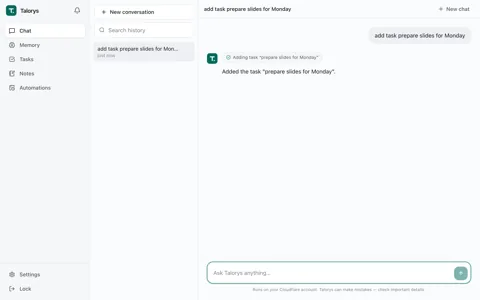
    Talorys is a personal AI assistant that one owner deploys into their own Cloudflare account, bringing chat, memory, tasks, notes, projects and reminders together in one browser app, and the repository describes version 0.1.4. There is no signup, the owner password is hashed locally with PBKDF2-SHA256 and stored as a Cloudflare secret, and the public pages.dev address is protected by that password, a SameSite=Strict session cookie and login lockouts. Requests go from a Cloudflare Pages app with a React screen to a private Worker without a public URL, one Durable Object built on the Cloudflare Agents SDK keeps conversations, memories, tasks, notes, projects, automations, settings and usage in SQLite, and the owner can download a backup file that leaves out sessions and credentials. The input is text typed into the chat, and the reply streams back as Markdown from Workers AI, by default @cf/zai-org/glm-4.7-flash, while the screen shows which tools are being called. Memories are facts and preferences the owner can view, edit and delete, at most 8 go into each turn with full-text matches first and up to 4 recent preferences filling the rest, and semantic recall with @cf/baai/bge-m3 is off by default and has a default cap of 500 embeddings a day when turned on. Tasks, notes and projects can be edited on screen or from chat, and a chat request to delete a task, note or memory becomes a proposal that runs only after the owner presses Approve in the app. Automations include one-time and recurring reminders, a task digest of due and overdue tasks made without AI, and AI prompt runs limited to read-only tools and 200-word answers, repeating daily, on chosen weekdays, monthly or every 15 minutes to 31 days on Durable Object alarms, and results arrive in the in-app notification center, with no push or email delivery found in the code that was read. Default limits are 1,024 output tokens, 6 tool calls and 6,000 context tokens per turn with older history summarized, plus 200 AI requests and 6 scheduled AI runs a day, each adjustable up to a set ceiling, and tasks, notes, memories and reminders keep working after the AI quota runs out. Deployment runs npx create-talorys@latest on Node.js 22 or later with Cloudflare's browser login or an API token holding Workers Scripts Edit, Cloudflare Pages Edit, Workers AI Read and Account Settings Read, and data stays in the owner's account without telemetry while Cloudflare processes chat messages and the memories in prompts for Workers AI inference. The README says the design fits the Workers Free plan under quotas that Cloudflare sets and can change, and at the time of writing Cloudflare gives 10,000 Workers AI Neurons a day, so on the free plan chat stops after that until the 00:00 UTC reset, while a paid plan has a $5 monthly minimum and bills extra Neurons at $0.011 per 1,000.
    License
    MIT Permissive. Commercial use and changes are allowed if the copyright notice is kept.
  21. 745

    FeiZhuLulu/DeepSeek-Bot

    What it does
    DeepSeek-Bot (DS Bot) is a bot plugin installed into DeepSeek Harness (DSH) that adds the ability to create several bots with their own names and roles, talk with them, and hand work to them as a group. It is aimed at DSH users who want to split work among several AI bots, and the repository states that it is an independent community project separate from official DeepSeek products. Each bot is a DSH session with its own name, role, instructions and model, the bots exchange messages through the message_bot, create_bot, update_bot and ask_user tools, and a default bot called Chief manages the others. In group chats the admin bot answers by default, a mention passes the turn to another bot or a PASS marker skips a turn, and each member keeps a hidden session per group. Instead of DSH's conversation compaction, a bot writes a checkpoint through a separate call to a small model when context usage reaches 0.8. Memory is split into per-bot and team scopes and managed through the remember, forget and recall tools and a review after every turn, with limits such as 300 characters per entry and 4,000 characters for MEMORY.md, and content that looks like a secret is rejected. Web search tries the provider set in the profile, then search through the model route, then public Bing and DuckDuckGo result pages, and the bot browser in Desktop reads pages as Markdown in a read-only view separated per bot, skipping password and card fields. request_secret is described as passing a value received through a user input card only as a shell variable and keeping it out of state.json and logs, but only exact copies are masked, so encoded or split values can leak, file mode 600 has no effect on Windows, and values are sent in clear text on a page opened over http. Installation is done through Add plugin in the Plugins menu of DSH Desktop (Windows, macOS), or by assembling a configuration bundle in DSH Web with Node.js 22.19 or later and pnpm, and installing DSH and connecting the plugin are separate steps. The documentation says this is an early v0.1 release whose features, tools and storage format may change and that it was tested with dsh 0.2.1-alpha.1 on Linux, data is stored by default under .dsh/bot in the user folder, and the usage screen shows tokens only, without cost.
    License
    Apache-2.0 Permissive, with a patent grant. Commercial use is allowed; keep the notices and state your changes.
  22. 744

    Kentucky-ai/opentakeoff

    What it does
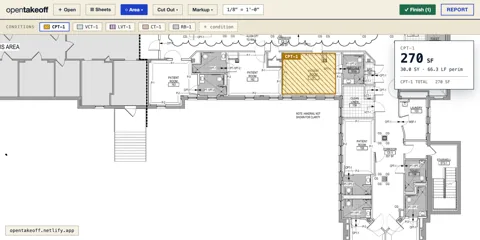
    OpenTakeoff is a measurement engine built so that people and AI agents can do takeoff together, measuring quantities such as lengths, areas and counts from construction drawing PDFs. It is aimed at estimators facing bid deadlines and at teams that want to hand quantity takeoff to an agent in an MCP client such as Claude. The same engine is used in two forms: a stdio MCP server run with npx (Node 20 or later, 53 tools, sheet resources, multi-document sessions) and a drawing canvas that runs in the browser without a server or account. Outputs are measurements, counts, quantity summaries, RFIs, CSV, JSON and Excel exports, marked-up drawing PDFs and DXF. Measurement must pass through a single coordinate system and a scale check, each record keeps its provenance, and agent work stays in a proposal state until a person confirms it and it receives an APPROVED mark. Data is stored in the browser's IndexedDB and localStorage, the team cloud is optional and uses Google sign-in and Drive, and the project states that running it as-is collects nothing and sends no data off the machine. OpenTakeoff is the measurement engine carved out of Spline, a commercial Division 9 (finishes) estimating system, in an open-core structure where the measurement engine and MCP server stay open while models trained on the company's own estimating archive stay proprietary. The current LICENSE, NOTICE, README and the mcp and web package settings say AGPL-3.0-only, GitHub metadata also shows AGPL-3.0, and the files state that code up to the apache-2.0-final tag (commit 84c7f48e) and earlier outside contributions stay under Apache-2.0. The Apache-2.0 wording in the repository description appears to be left over from before this change, the specific list of current files that remain Apache-2.0 could not be confirmed, and the contributor license agreement (CLA) lets Kentucky AI license later contributions under commercial terms outside the AGPL as well, so a license review is needed before reuse. The README states that the One-Click Area feature is temporarily gated for re-validation, that snapping is in beta, that revision comparison works on quantity differences, and that the translated READMEs are updated later than the English one.
    License
    AGPL-3.0 Network copyleft. Offering a modified version as a service also requires releasing the source. Review before any product use.
  23. 743

    Jakubantalik/transitions.dev

    What it does
    transitions.dev is a repository that combines a collection of CSS transitions for web interfaces with a CLI that adds them to projects, a skill for coding agents, and transitions-agent, which checks interface motion. Its main users are front-end developers who want consistent screen transitions and animations, and people who build interfaces with coding agents such as Claude Code or Cursor. Each transition is provided as a copy-ready CSS snippet with :root custom properties, t- prefixed classes and prefers-reduced-motion handling. The transitions-dev CLI (MIT, Node 18 or later) adds and lists free transitions without an account, while Pro transitions are downloaded from api.transitions.dev after a device sign-in, with entitlement checked on every download. transitions-agent (MIT) scans interface code locally with 11 rules and gives a motion score from 0 to 100, and its GitHub Action posts a score comment on a PR and then opens a fix PR against that PR branch. The fix command sends the affected files to a hosted fix service, shows the changes Claude generates as a diff first, writes them to files only after the user approves, and is described as limited to CSS transitions and animation guards. The free sign-up tier offers unlimited scans and Action runs, unlimited fixes through the user's own Claude Code or Cursor, and up to 10 hosted fixes a month and 2 a day, while the Business plan at 59 dollars a month includes 5 Pro seats and 200 fixes a month. The custom Transitions.dev License allows modifying and shipping in personal and commercial projects and forbids redistribution as a competing library, and company use of Pro transitions or paid Agent features needs a Business seat for each person. The CLI and agent tooling are MIT, and GitHub's NOASSERTION license label appears to come from this custom license. Transition counts differ across sources, with 12 in the README table, 18 in the README text, 43 or more in the repository description, and 32 free plus 11 Pro in the agent document, so the actual number should be counted directly, and because hosted fixes send code to an outside service, the scope of files to send should be set before using it on company code.
    License
    Custom license Custom or non-standard license. Read the license file before any reuse.
  24. 742

    SukkaW/Make-Bilibili-Great-Than-Ever-Before

    What it does
    Make Bilibili Great Than Ever Before is a TypeScript userscript that changes ads, tracking and playback settings when watching the Chinese video site Bilibili. It is an MIT-licensed project that rewrites a fork of Make Bilibili Great Again in TypeScript, and once installed in a userscript manager such as Tampermonkey, Violentmonkey or the AdGuard extension, it runs early in page loading on the www, t, live and space subdomains. Its 16 modules are switched on and off one by one from a menu, it intercepts the page's fetch and XHR calls to modify only the requests and responses it needs, and it makes the patched fetch look like the original browser function to checking code such as Sentry. On privacy, it blocks log reporting and user tracking requests, replaces Sentry and reporting objects with empty functions, blocks browser storage writes used for logs and reports to cut disk writes, and strips tracking parameters such as vd_source from URLs. Ad elements are hidden by shrinking them to 1 pixel with opacity 0, and a code comment explains that the display value is left unchanged because the site checks the display value of ad links to detect ad blocking. On playback, it turns off AV1, replaces the P2P and PCDN loaders and WebRTC with fake objects so official CDN addresses are used, adds a video crop mode to the player, and for live streams requests the original quality route but falls back to the quality chosen in the player after five failures within 30 seconds. The 4K module changes the player's local setting values and presents the browser as macOS Safari so the 4K, HDR and Dolby Atmos options turn on even on low-end devices, and since no code modifies the playback address responses, the quality actually received depends on the server response. Thread Ripper, off by default, splits video segments into smaller pieces, requests them from several CDN hosts at once and uses the first response to arrive, and as its module description says, it can use more bandwidth and data. It also tidies ads and layout on the home and dynamic (story) pages, lifts the no-reprint marker (unable-reprint) and copy event handling on column (/read/cv) pages so the text can be copied, and removes the site-wide grayscale effect and HarmonyOS fonts so the system default font is used. A read of the full source found that it only reads playback address responses and uses the signed addresses the site issued as they are on Bilibili CDN hosts, no code that bypasses login, paid membership or region restrictions was found, and because it depends on Bilibili's internal page structure, some modules can break when the site changes.
    License
    MIT Permissive. Commercial use and changes are allowed if the copyright notice is kept.
  25. 741

    huggingface/transformers

    What it does
    Transformers is Hugging Face's Python library that gathers model definitions for text, image, audio, video and multimodal models for use in inference and training. Its main users are researchers, ML engineers and developers who want to download and run or fine-tune open models, and more than 1 million checkpoints in this format are published on the Hub. It serves as the shared reference whose model definitions are also used by training tools such as Axolotl, Unsloth and DeepSpeed, inference engines such as vLLM, SGLang and TGI, and llama.cpp and mlx. Each model consists of three classes, a configuration, a model and a preprocessor, and Pipeline runs text generation, speech recognition, image classification and visual question answering in a few lines of code. Trainer supports mixed precision, torch.compile, FlashAttention and distributed training, and generate offers streaming and several decoding strategies. Getting started requires Python 3.10 or later and PyTorch 2.6 or later, downloaded models are stored in the HF_HUB_CACHE folder, and offline use means downloading in advance with snapshot_download and then setting HF_HUB_OFFLINE=1. transformers serve, available through the serving extra, opens an OpenAI SDK compatible server at localhost:8000 with endpoints such as chat completions, responses, audio transcription and model listing. Tool calling works with models whose tokenizer declares tool call tokens, and the official documentation presents this server for evaluation, experiments and moderate-load deployment while recommending vLLM or SGLang for large-scale production. The official README presents the library as a model-definition-centered tool, and because its training API is tuned to the PyTorch models Transformers provides, it recommends Accelerate for generic training loops and adapting the example scripts to each situation. The README still carries wording about moving models between PyTorch, JAX and TF2.0, but the current setup.py (5.19.0.dev0) and installation docs cover PyTorch only, and while the library is Apache-2.0, each checkpoint can carry its own license and access conditions.
    License
    Apache-2.0 Permissive, with a patent grant. Commercial use is allowed; keep the notices and state your changes.

  26. 740

    awesome-selfhosted/awesome-selfhosted

    What it does
    awesome-selfhosted is a list repository that collects, by field, Free Software network services and web applications that can be installed and run on your own servers. Individuals, administrators and organizations who want to run services such as wikis, document management or task management on their own servers instead of outside SaaS use it to look for options. The repository holds a list document instead of runnable programs, and more than 1,200 entries under more than 90 categories are organized with a name, link, one-line description, demo or source links, and license and language labels. There are also work-related categories such as document management, generative AI, groupware, inventory management, knowledge management, manufacturing, resource planning, task management, ticketing and wikis. Entries that depend on a proprietary outside service the user cannot control carry a warning mark, and non-free software is on a separate list page. This Markdown list is generated from the data in the awesome-selfhosted-data repository, where the contribution guide and the list of authors also live, and the maintainers recommend the HTML version at awesome-selfhosted.net. The license of the list itself is CC BY-SA 3.0 Unported according to the LICENSE file, GitHub's NOASSERTION label appears to come from this document license, and each program follows its own license. The descriptions are one-line introductions, so before actual adoption the maintenance status, security and installation requirements of each project should be checked directly.
    License
    Custom license Custom or non-standard license. Read the license file before any reuse.
  27. 739

    flutter/flutter

    What it does
    Flutter is Google's SDK for building mobile, web and desktop app interfaces from a single codebase. Its main users are app developers and designers who want one team to build apps for Android, iOS, the web, Windows, macOS and Linux together. Developers write screens by composing widgets in the Dart language, Flutter draws them directly with the Skia and Impeller rendering engines, and it provides the Material and Cupertino widget sets. Dart code compiles to ARM machine code on iOS and Android, to JavaScript and WebAssembly on the web, and to x64 and ARM code on desktop. During development, hot reload applies code changes immediately while keeping state, FFI and platform channels call each operating system's features, and developers use pub.dev packages and the VS Code and IntelliJ plugins. The official supported platforms document (as of Flutter 3.47) lists Android API 24 to 37, iOS 15 to 27, Windows 10 and 11, macOS 12 to 27, Debian 10 to 13, Ubuntu 20.04 to 24.04 LTS, and the latest two versions of Chrome, Firefox and Edge plus Safari 15.6 or later as targets. The iOS setup document assumes Xcode and a USB connection to a Mac, so it is safest to assume a Mac is needed for iOS builds. The Flutter tool downloads resources from Google servers, installing from GitHub downloads the Dart SDK on first run, and the documentation notes that using the SDK means agreeing to the Google Terms of Service. The web FAQ describes Flutter web as a fit for app-centered interfaces such as PWAs and SPAs, and recommends HTML or Jaspr for text-heavy static websites and content where search visibility matters. The repository license is BSD-style (BSD-3-Clause).
    License
    BSD-3-Clause Permissive. Commercial use is allowed; keep the notice and do not use the authors' names for endorsement.
  28. 738

    t4t5/omdrop-owl

    What it does
    omdrop-owl is a radio backend connecting omdrop on Linux machines without Apple's Broadcom Wi-Fi hardware. It is a lower-level component for AirDrop transfers, not a standalone file-sharing application or AI model. OWL runs AWDL on a monitor interface, and omdrop's sending and receiving tools use that network. Users can exchange files with phones through this setup, but omdrop itself and related tools are separate requirements. The inspected hardware configuration marks only the MediaTek MT7925 mt7925e driver as tested; other drivers remain untested. Sharing the radio while retaining Wi-Fi requires the access point to use channel 6, 44, or 149. The package installs radio helpers, permission policies, and NetworkManager rules and is not used alongside another radio backend. Documentation describes reconnection to avoid failures after deleting the monitor interface and says exclusive radio mode is not implemented. Compatibility depends on the card and driver, and a repository license was not established from the collected material.
    License
    No license No license file found. Without a license, reuse of the code is not permitted by default.
  29. 737

    storytold/designcraft

    What it does
    DesignCraft is a Rust-based page layout and publishing product for arranging text and graphics. It targets creators of multipage reports, magazines, and guides rather than serving as a resource collection or simple design plugin. Text frames, threaded stories, paragraph styles, colours, and images form documents using a native editable format, IDML, and page images. Desktop and WebAssembly browser versions are available, with the web version using file selection and downloads for input and output. Its MCP server exposes document creation, text editing, image placement, and page rendering in either a headless engine or a connection to the running app. Window clicks and dialog operations require connected mode, and the web build has no control channel. Starting requires a packaged app or Rust build environment; AI control additionally requires MCP client configuration. Font and asset terms need review, and Asian typography and InDesign compatibility do not have complete parity. The README calls PDF output planned while the ROADMAP describes it as implemented, so PDF output and print suitability must be verified for the chosen release.
    License
    Apache-2.0 Permissive, with a patent grant. Commercial use is allowed; keep the notices and state your changes.
  30. 736

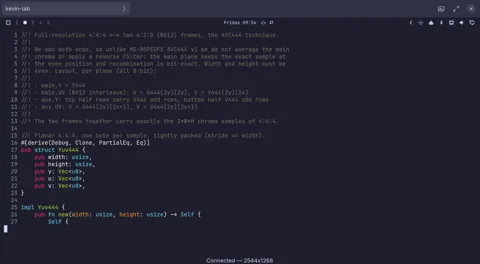
    omacom/gliff

    What it does
    gliff is a remote desktop product for viewing and controlling another machine's Hyprland session over SSH. It targets Linux users and developers running Hyprland at both ends. Remote screen content is displayed locally while keyboard and pointer input travels back to the host. It can mirror an existing display or create a private display lasting for the connection, and it supports clipboard transfers of text, images, and files. The architecture describes splitting colour information across two H.264 streams and recombining it to preserve coloured text detail. AMD and Intel systems with Vulkan and VA-API use a GPU path; unsupported environments and NVIDIA use a CPU path whose default colour quality can differ. Both ends need installation, SSH access, and a running remote Hyprland session, but no separate relay service. It adapts quality on slow links without eliminating TCP stalls on high-latency, lossy connections. The direct development connection mode lacks authentication, and displays wider than 4096 pixels may be streamed at reduced size.
    License
    MIT Permissive. Commercial use and changes are allowed if the copyright notice is kept.
  31. 735

    JimLiu/baocut

    What it does
    BaoCut is an AI video editing product that turns footage and editing requests into an editable timeline. It targets creators repeatedly revising subtitles, translations, dubbing, and presentation videos. Its documentation describes transcription, subtitles, speech synthesis, removal of unwanted segments, and code-based motion graphics. Outputs include MP4, subtitle files, audio, and project bundles preserving edit history. Desktop, CLI, MCP, and web surfaces are documented as sharing one local Runtime and the same editable video. Packaged apps include the Runtime and native workers, but agent features require a signed-in external engine, while ffmpeg and ffprobe must be supplied separately. Local models and online providers are available, but their files and service connections are not automatically all configured. Windows packages are unsigned, and GPU inference has not been validated on actual hardware according to the project. This is source-available software under the BaoCut Community License rather than a standard open-source license; software resale, hosting, and embedding in commercial products require separate permission. Some model licenses are non-commercial and need review independently of the application terms.
    License
    Custom license Custom or non-standard license. Read the license file before any reuse.
  32. 734

    CopilotKit/OpenIntelligentUI

    What it does
    OpenIntelligentUI is a chat application and development foundation that answers with text, tables, and interactive interfaces. It targets developers offering explanations, comparisons, and small tools within conversations. A Python agent processes the request and streams results through CopilotKit and AG-UI to the browser. Jev selects the presentation, using A2UI for basic tables and sandboxed HTML, CSS, and JavaScript for richer visuals and calculators. Controls can send selected values into a follow-up request, but the documentation provides no API for directly patching a previous output from another call. Requirements include Node.js 22+, pnpm 9+, Python 3.12+, uv, and separate OpenAI and Jev keys. Visitor keys remain in browser memory but pass through the application server to providers, so the deployment operator must be trusted. The inspected query_data source returns the entire sample CSV without query filtering or live company data access. Conversation checkpoints live in process memory and are not durable across restarts or shared across multiple servers.
    License
    MIT Permissive. Commercial use and changes are allowed if the copyright notice is kept.
  33. 733

    xtool-org/xtool

    What it does
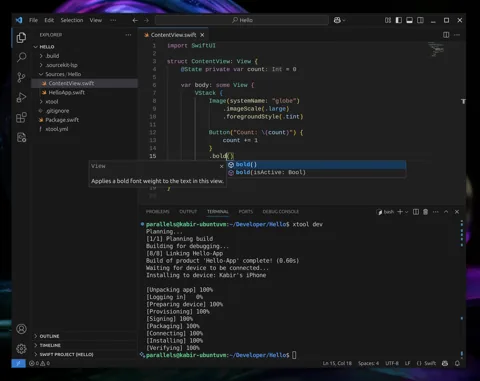
    xtool is a development tool that builds SwiftPM projects into iOS apps and installs them on devices from Linux, WSL, or macOS. It targets Swift developers who do not want to depend exclusively on Xcode on a Mac. Swift source and package configuration become an app through packaging, signing, and installation. It also provides device discovery, app launching, and access to Apple Developer Services. An XKit library exposes some capabilities to Swift programs. Getting started requires Swift tooling, an iOS SDK, Apple authentication, and a configured device connection. The Linux guide builds the SDK from Xcode.xip, while Windows requires WSL and USB connection setup. Authentication offers public API keys for paid developer accounts or password authentication using private Apple APIs, so account policies and security need review. Installation alone does not configure the SDK and signing environment, and complete replacement of every Xcode feature has not been established.
    License
    MIT Permissive. Commercial use and changes are allowed if the copyright notice is kept.
  34. 732

    Predidit/Kazumi

    What it does
    Kazumi is an anime search and playback app built with Flutter that finds titles on video source sites with user-made rules and streams them inside the app. A rule is built from up to five XPath selectors and can be imported and shared, and only selectors that start with // are currently supported. Title information comes from the Bangumi open API, danmaku comments from the dandanplay open platform, watch-together from public SyncPlay servers, and image-based title search from trace.moe. Features include an airing timetable, subtitles, downloads, cross-device sync, DLNA casting, playback in external players and real-time super-resolution based on Anime4K, which demands a strong GPU. It supports Android 10 or later, Windows 10 or later and macOS 10.15 or later, Linux is experimental, and iOS 13 or later and HarmonyOS 5.0 or later, the latter from a separate fork repository, need sideloading. During playback it caches as much video as possible in memory, so a low-memory mode is available when memory is tight, and the README says ads in some titles come from the video sources. The README states that it has no user data collection and no telemetry components, and its disclaimer asks users to follow local laws, respect third-party intellectual property and delete data and cache produced by use within 24 hours. The license is GPL-3.0, and the icon is a work used with the original artist's permission, so using it requires separate permission.
    License
    GPL-3.0 Copyleft. Distributing software that includes this code requires releasing the source under GPL.
  35. 731

    storytold/effectcraft

    What it does
    EffectCraft is an open-source motion graphics app that reimplements the After Effects way of working in Rust, and its repository was created on 1 October 2026. It runs as a desktop app and in the browser, and it is meant for people who make animated titles, explainer videos and visual effects. It offers layers, keyframes, a Graph Editor, expressions, puppet tools and 3D cameras and lights, and the README says its 306 effects include every one of the 298 effects in After Effects. Projects are saved as versioned JSON files (.ecproj), Lottie files can be imported and exported, and built-in Rust encoders produce H.264, ProRes, HEVC, AV1, WebM, EXR and GIF without FFmpeg. Actions are collected in one command registry, so the same action can be called from the interface, the CLI, a JSON control channel and an MCP server for AI agents. The control channel is a TCP port on 127.0.0.1 with no authentication, and the documentation says to enable it only while it is in use. Scripts work only inside the project folder, writing files and using the network need a separate preference, and the README states that there is no telemetry and no network access unless requested. Installers are on the releases page, building from source needs Rust 1.95 or later, and the optional MobileSAM model of about 40 MB is downloaded separately. It cannot open .aep or .aepx files or run After Effects plug-ins, macOS is the most tested platform, and basic interaction bugs remain on Linux and Windows. The authors' gaps document puts feature coverage at about 99 percent on a checklist they wrote and graded themselves, while coverage for real professional work is still unmeasured and estimated at about 30 to 50 percent.
    License
    Apache-2.0 Permissive, with a patent grant. Commercial use is allowed; keep the notices and state your changes.
  36. 730

    storytold/pdfcraft

    What it does
    PdfCraft is a Rust desktop app for viewing, organizing and editing PDFs, and it is the same repository that was renamed from PrintCraft on 7 October 2026. It reimplements Acrobat features independently, ships apps for macOS, Windows, Linux and FreeBSD plus a WebAssembly browser build, and the README states that it has no account, telemetry or cloud connection. It takes PDFs and edit commands and outputs edited PDFs, text extracted in reading order, document information as JSON and page images. Page organizing, combining, extracting and splitting keep links, forms, layers, attachments and bookmarks, and saving is incremental, keeping the original bytes and checking the result with qpdf. It handles passwords from RC4 40-bit to AES-256, and the README lists forms, threaded comments, redaction, basic signatures and an accessibility checker as usable today. For agents it offers command-line runs driven by a JSON Schema tool table and an opt-in stdio MCP server, which communicates only through standard input and output and confines files to one folder with --root. The author reports that 963 of 983 pdf.js test files opened and rendered without crashes and puts feature progress at about 50 percent, and both figures are the author's own measurements. Rendering still relies on the hayro library, and editing existing text, especially CJK text, Office conversion, PDF/A preflight and long-term signature validation are thin or missing. OCR needs separately downloaded CC-BY-SA-4.0 model files, English is the only registered language, and the README notes that fuzzing still finds crashes and hangs. It is licensed under MIT or Apache-2.0 at the user's choice, while the ArtCraft trademarks are excluded from the license and must be removed in forks.
    License
    Apache-2.0 Permissive, with a patent grant. Commercial use is allowed; keep the notices and state your changes.
  37. 729

    KingKongRobotics/jumper

    What it does
    Jumper is an open-source toolkit for developing a crab-shaped robot with 22 degrees of freedom by giving prompts to an AI coding assistant. The robot's appearance becomes a .skin file through the separate jumper-design repository, and motions such as a tripod gait are trained with reinforcement learning, replayed and evaluated, and then packaged as .app files. Scenes are defined as .map files, and simulation runs on mjlab, rsl_rl, MuJoCo and MuJoCo Warp. The repository contains URDF meshes, state machine code for deployment under deploy/fsm, a tests folder and skill files under .claude/skills that the AI coding assistant reads. The README states that maintainer materials are licensed under Apache-2.0 and that this license does not automatically extend to generated outputs. The README is 68 lines long, so this entry covers only what the README and the file list show.
    License
    Apache-2.0 Permissive, with a patent grant. Commercial use is allowed; keep the notices and state your changes.
  38. 728

    threerocks/hand-drawn-styles

    What it does
    hand-drawn-styles is a library of prompt recipes for hand-drawn style illustrations, shipped both as a Claude Code skill and as tool-agnostic documents. The repository currently holds 18 styles plus one variant, 19 recipes in total, and the figure of 5 in the repository description is outdated. When a user describes the content and the style, the final output is the prompt text for image generation. The images themselves are produced by the user in separate image tools such as gpt-image, Jimeng or Midjourney. The skill pulls the recipe text verbatim through a bundled Python script, shows a menu and waits for a choice when no style is named, and fills placeholders from the request. Variant 3.1 outputs a JSON package with a fixed three-stage workflow and checks the anchor image by its 1086x1448 size and a pixel SHA-256 value. For Claude Code it is installed by cloning into the skills folder, and other tools follow the PROTOCOL.md and STYLES.md documents. The license is MIT, but style 3 carries the Ghibli name, so commercial use needs a rights review.
    License
    MIT Permissive. Commercial use and changes are allowed if the copyright notice is kept.
  39. 727

    Tencent-Hunyuan/Hy-MT2

    What it does
    Hy-MT2 is a family of translation language models released by the Tencent Hunyuan team in three sizes, 1.8B, 7B and 30B-A3B, the last being a mixture-of-experts (MoE) model. The models translate among 33 languages, and Korean and Japanese are in the supported language table. Users give the source text and translation instructions as a prompt and receive the translation, and the README provides prompt templates for terminology, style, personalization, delimiters and structured data. The maximum context length is 8192 tokens and there is no default system prompt, so long documents need to be split before translation. FP8 and GGUF quantized versions, which shrink the model files, go down to 2-bit and 1.25-bit formats, and the README says the 1.25-bit version of the 1.8B model needs about 440 MB of storage. Running it requires transformers 5.6.0 or later with trust_remote_code, a setting that executes code from the model repository, or vLLM and SGLang built from source, and the README says low-bit formats in llama.cpp need the STQ kernel from pull request 22836. LoRA or full fine-tuning runs through LLaMA-Factory with DeepSpeed, and the training guide asks for one GPU with 24 GB or more for 1.8B, one 80 GB GPU for 7B LoRA and eight 80 GB GPUs for 30B. The IFMTBench benchmark for instruction-following translation is published under CC-BY-4.0 and scores six constraint types with rules and an LLM judge. The model license is Apache 2.0 according to LICENSE.txt, and the README benchmark comparisons were not independently checked here.
    License
    Custom license Custom or non-standard license. Read the license file before any reuse.
  40. 726

    yifanfeng97/Hyper-Extract

    What it does
    Hyper-Extract is a Python library that extracts facts and relations from documents into structured knowledge such as knowledge graphs, and it ships the he CLI and the he-mcp server. It is meant for developers and analysts who want to turn scattered documents into knowledge that supports search and question answering. It reads txt and md files directly, and an optional install extra based on markitdown adds PDF, DOCX, PPTX and XLSX. Results are stored in structures such as lists, sets, graphs, hypergraphs, temporal graphs, spatial graphs, spatio-temporal graphs and document collections, and they can be exported to Obsidian, GraphML, CSV, JSON-LD and Cypher. Users choose among domain YAML templates such as finance, legal, medicine and industry and extraction methods such as GraphRAG, LightRAG, Hyper-RAG and KG-Gen. Extraction needs an LLM that supports function calling, a way of receiving answers in a fixed format, together with an OpenAI-compatible embedding model. According to the provider documentation, Anthropic, Gemini and DeepSeek need a separately paired embedding model, and Bailian qwen-max and deepseek-v3 support only the json_object format and cannot be used. Each document's source and content hash are recorded so only changed documents are processed again, and the content that came from one document can be rolled back on its own. The he-mcp server only reads and exports, offering tools for listing templates, viewing information, search, question answering and export. Knowledge templates accept only Chinese or English as the language option, directory processing reads only the files directly inside the given folder, and PDFs without a text layer need OCR first.
    License
    Custom license Custom or non-standard license. Read the license file before any reuse.
  41. 725

    docker/docker-agent

    What it does
    docker-agent is an AI agent runtime from Docker that defines agents in a YAML file and runs them with the docker agent command. The YAML lists the model, instructions, toolsets, sub-agents, fallback models, an iteration limit and skills. Tools are attached as MCP servers through the Docker MCP Gateway, local stdio or remote HTTP, alongside built-in tools such as think, todo and memory. Memory is kept in a SQLite file in the user's home folder, and RAG supports search that mixes BM25 with embeddings, plus reranking. Models come from external providers such as OpenAI, Anthropic, Gemini and Bedrock or from local models in Docker Model Runner, and the user sets the API keys. It installs as a plugin bundled with Docker Desktop 4.63 or later, or through Homebrew and release binaries. By default it asks the user before running tools with side effects, and permission rules can be applied in deny, allow, ask order. The --yolo option approves every tool automatically, sandboxed runs need Docker Sandboxes installed separately, and the working folder is mounted with write access. It also hands work to CLIs on the PATH such as claude and codex, serves a REST API with a session database, shares agents through OCI registries and evaluates by replaying saved sessions. Telemetry is on by default, and the documentation says not to assume the collected data is free of secrets or personal information.
    License
    Apache-2.0 Permissive, with a patent grant. Commercial use is allowed; keep the notices and state your changes.
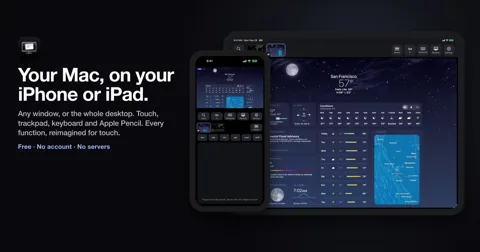
  42. 724

    openai/math

    What it does
    This repository publishes mathematical manuscripts and supporting proof artifacts produced by an unreleased internal OpenAI model. It is intended for researchers examining proposed results on open mathematical problems, rather than users seeking a runnable problem-solving service. Readers choose a result family or manuscript and obtain papers, source files, citation information and, where available, Lean formalizations. Lean is a language and system for expressing statements and checking formal proofs. The collection groups related results into families and links papers to proof materials and verification configurations. The inspected Lake configuration pins dependencies, while a Comparator challenge specifies the theorem, solution module and permitted axioms to check. Reading papers needs no model access, but checking formalizations requires the specified Lean toolchain, dependencies and additional verification tools. The authors explicitly warn that verification stages differ and unformalized results may contain errors; neither the proofs nor the model's performance were independently verified in this review.
    License
    Apache-2.0 Permissive, with a patent grant. Commercial use is allowed; keep the notices and state your changes.
  43. 723

    storytold/vectorcraft

    What it does
    VectorCraft is a Rust vector illustration editor for designers working with paths, text, layers and multiple artboards. It opens its JSON-based native document format, SVG and PDF, including PDF-compatible Illustrator files, and exports vector or raster artwork. Geometry operations, live appearances and a separate rendering engine let users edit shapes without making the interface itself the document model. The CLI and MCP, a tool connection protocol for agents, expose drawing commands, document inspection and rendered previews in either headless or connected desktop mode. The current Cargo manifest specifies Rust 1.95, while desktop targets include macOS, Windows, Linux and FreeBSD and the browser build uses WebAssembly. Japanese fonts can come from the optional shared font repository, with installed system fonts used when that input is absent on desktop. The README still identifies gaps in advanced effects, CJK vertical composition, interaction fidelity and Windows/Linux packaging rather than promising full Illustrator parity. The MCP documentation separately warns that progress notifications, in-flight cancellation and resource subscriptions are unimplemented, and rendering speed claims have not been independently reproduced here.
    License
    Apache-2.0 Permissive, with a patent grant. Commercial use is allowed; keep the notices and state your changes.
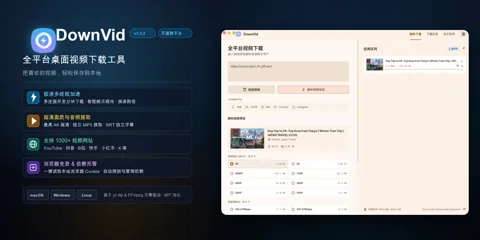
  44. 722

    storytold/printcraft

    What it does
    PrintCraft is a Rust PDF workbench for reading, organizing and modifying documents, not a 3D printing application. It accepts PDFs and editing commands and produces revised PDFs, extracted text and document information, or rendered page images. Its desktop interface, command-line interface and MCP agent interface expose a shared document automation layer. That layer manages open document sessions, rendering and text caches, while search results can include page coordinates. Ordinary incremental saving preserves original bytes, so it must not be confused with removing sensitive information. Local operation is available, while building from source requires the Rust toolchain and relevant dependencies, and OCR needs separately supplied model files. The inspected OCR implementation registers English rather than providing general Korean scan recognition. Existing text editing, CJK handling, Office conversion and advanced PDF compatibility remain limitations that prevent treating it as a fully interchangeable Acrobat replacement.
    License
    Apache-2.0 Permissive, with a patent grant. Commercial use is allowed; keep the notices and state your changes.
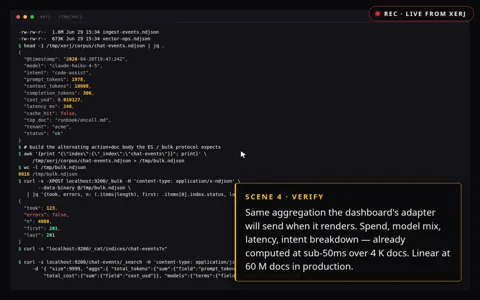
  45. 721

    storytold/lightcraft

    What it does
    LightCraft is a Rust photo library and development application for photographers who organize and adjust images locally. It imports JPEG, DNG and several camera RAW formats, keeps originals separate from edits, and exports formats including JPEG, PNG and TIFF. Its engine processes light and color in a wide-gamut floating-point pipeline, with a GPU path and CPU fallback. Albums, ratings, search and an operation log connect photo selection with saved development settings. The desktop interface, CLI and MCP, a protocol for exposing tools to agents, share engine commands for importing, adjusting, rendering and exporting. Source builds use Rust and Cargo for macOS, Windows and Linux, while the browser build additionally needs the WebAssembly target and a matching wasm-bindgen tool. The documentation warns that camera color calibration is incomplete outside DNG, some RAW formats only expose embedded previews, and subject and sky masks use heuristics rather than learned segmentation. Its speed and CPU/GPU agreement figures are maintainer reports, not results independently reproduced here.
    License
    Apache-2.0 Permissive, with a patent grant. Commercial use is allowed; keep the notices and state your changes.
  46. 720

    storytold/filmcraft

    What it does
    FilmCraft is a Rust video editor for people who assemble footage, sound and captions on a multitrack timeline. It imports media and interchange documents, applies cuts, grading, effects and audio mixing, and exports videos, audio or project exchanges. The architecture separates codecs, project data, rendering and an engine whose commands are shared by the desktop UI, CLI and MCP agent interface. Integer timeline ticks and project snapshots support precise edit positions and undo, while export jobs expose progress and cancellation. Desktop source builds use Cargo for macOS, Windows and Linux, and optional shared fonts support Japanese text. Although the README still calls the browser frontend a future step in one section, the web application README and web documentation describe an existing WebAssembly build requiring the matching wasm-bindgen tool. That browser path is single-threaded and documents unavailable thread-dependent functions, so it should not be treated as equivalent to the desktop path. The project also reports missing HEVC and AV1 export, absent external effect plugin hosting and less real-media testing on Windows and Linux, while its speed and compatibility figures remain upstream claims.
    License
    Apache-2.0 Permissive, with a patent grant. Commercial use is allowed; keep the notices and state your changes.

  47. 719

    Ebony-Vinyl/dsh-our-free-model

    What it does
    This dsh plugin connects an agent to externally hosted models rather than running model weights locally. It sends conversation messages, tool results and optional images to upstream gateways and returns model answers or tool calls. Its adapter refreshes model catalogs, probes availability and translates several response protocols into the host's streaming format. It also offers a local OpenAI-compatible forwarding service and local usage records. Starting requires a compatible dsh host, a supported Node.js runtime and network access. Kilo officially allows anonymous requests to free models, but applies IP-based rate limits. The OpenCode route additionally imitates client fingerprints, so its authorization and service terms need separate review rather than treating every route as an officially supported public API. Other account channels and the desktop EAC route have separate login or authorization requirements, and the free gateways must not be treated as unlimited, private or suitable for sensitive production data.
    License
    MIT Permissive. Commercial use and changes are allowed if the copyright notice is kept.
  48. 718

    omnirush-ai/omnirush-gui

    What it does
    OmniRush is a desktop application for asking a coding agent to work on a selected project. Prompts and project files become inputs, while edited files, command results and Git work become outputs. An Electron shell starts a local server and a bundled OpenCode engine that exposes skills and MCP tools to the selected model. MCP is a common interface through which agents call external tools. The application requires an approved OmniRush account and device sign-in before it runs prompts, and the available model catalog comes from that account. Published desktop builds target Apple Silicon macOS and Linux, not a native Windows desktop release. Free access is offered by the service itself, but its privacy policy permits collecting session traces and project uploads for model development and research partners. The desktop code is largely MIT-licensed, while the enterprise directory has separate terms, so neither local execution nor public source means private processing or unrestricted enterprise reuse.
    License
    Custom license Custom or non-standard license. Read the license file before any reuse.
  49. 717

    joshuaswarren/omarchy-apple-dev

    What it does
    This project provides scripts and compatibility tools for developers who want to build iOS apps from Omarchy Linux instead of running Xcode on macOS. Its inputs include Swift or SwiftUI app sources, project resources and an Apple-distributed iOS SDK. Swift and xtool produce an app bundle, while separate scripts handle USB device installation and preparation of an IPA distribution package. The inspected shipping script sequences release building, resource preparation, signing, packaging and offline validation, with upload enabled only by an explicit option. Starting requires a supported Linux machine, a matching Swift and SDK combination and an Apple ID to obtain the Xcode archive containing the SDK. Physical-device work also needs an iPhone and USB connection, while TestFlight requires a paid Apple Developer account and App Store Connect credentials. The README reports successful builds and Apple processing for selected apps, but those results were not reproduced in this review. It also distinguishes older device-debugging evidence from the newer toolchain and describes Linux-only wireless deployment limits, so this should not be treated as universal Xcode compatibility.
    License
    MIT Permissive. Commercial use and changes are allowed if the copyright notice is kept.
  50. 716

    cclank/lanshu-create-ai-presenter-video

    What it does
    This Agent Skill guides a file-reading and shell-capable agent through explainer-video production rather than providing a standalone presenter model. A presenter job takes a topic or script and an authorized adult portrait, while the styled route can work without a presenter image. The presenter route coordinates narration, presenter generation, lip synchronization, captions, editing, and review; the styled route uses reusable visual styles and timed narration. Approved narration supplies the timeline, and a job JSON records approvals, capabilities, task identifiers, artifacts, and review reports. Bundled scripts derive production states from recorded evidence and prepare a master video, share copy, and delivery report with media checks. Setup requires a compatible agent, Python 3.9 or newer, FFmpeg and ffprobe, plus the documented shell tools; installing the skill does not supply generation services. Presenter production needs separately available voice, presenter, and lip-sync capabilities, while styled production adds Node.js and HyperFrames and uses MiniMax voice access or the user's own narration. Paid calls and uploads need approval, and task identifiers and retry limits are used to control repeated charges. Technical checks do not prove factual accuracy or visual quality by themselves, and human review remains part of the workflow.
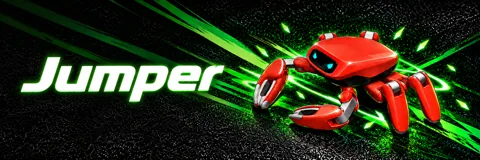
    License
    MIT Permissive. Commercial use and changes are allowed if the copyright notice is kept.

Showing 50 of 962

Only repositories in the ranked Trendshift lists are included, and the lists are used only to find candidates. We do not copy their ranks. Descriptions, licenses and star counts come from each GitHub repository. The notes are our own reading. We have not tested these projects, and a place on a trending list does not prove quality. Trendshift RSS feed