Saffsanity/sill
- Source
- GitHub
- First trending
- Category
- Other
- GitHub stars
- 634
- Main language
- Swift
This page introduces an external open-source repository. It is not an HDATF product.
What it does
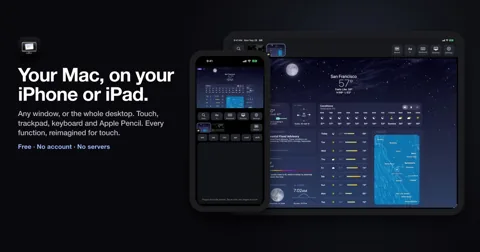
Sill is an Apache-2.0 licensed pair of apps, one for the Mac and one for iPhone and iPad, that shows one Mac window or the whole desktop on the device and lets the user operate it there with touch, a trackpad, a keyboard or Apple Pencil. Sill for Mac is a free notarized download (checked by Apple for distribution outside the App Store) from getsill.app, and Sill for iPhone and iPad is free on the App Store. When a device picks a window, Sill for Mac captures it with ScreenCaptureKit, encodes it as HEVC with VideoToolbox and sends it over TLS 1.3 on TCP, and capture runs only while a device is connected. When the encoder or the link falls behind, Sill for Mac drops frames instead of queueing them, and the device shows each decoded frame at once so the picture stays current. Taps, clicks, scrolls, keys and Apple Pencil input become mouse and keyboard events on the Mac through the Accessibility permission, and three-finger gestures run features such as Mission Control. Devices find the Mac with Bonjour on the local network or connect over a USB cable, and Remote Access, off by default, lets paired devices also connect from other networks through the user's own VPN or a router port forward to TCP port 7455. Each device pairs once with a QR code or a 12-digit code shown on the Mac (automatically over the cable), after which every connection accepts only the keys exchanged when pairing, and the Mac keeps its keys and the paired-device list in its keychain without iCloud sync. There is no account and no relay server, and the only request beyond the user's devices is Sill for Mac's once-a-day update check, which sends its version number to GitHub and can be turned off. The Mac must be an Apple silicon model on macOS 14 or later with the Screen Recording and Accessibility permissions, and macOS 15 or later also needs the Local Network permission. The iPhone or iPad needs iOS or iPadOS 17 or later with Local Network and camera access, and building from source needs Xcode 27 (Xcode 27.1 for the iPhone and iPad app). Limits listed in the docs are one window or the desktop at a time, picture without the Mac's sound, a brief black frame when a window is resized, and stalls after a lost packet because the transport is TCP. The docs also note that with Require pairing turned off any device on the network can connect (still encrypted), and that Sill for Mac 0.3.1 and earlier had no encryption or pairing on home connections.
License
Apache-2.0 Permissive, with a patent grant. Commercial use is allowed; keep the notices and state your changes.
More in this category
- bherbruck/solidcraft
SolidCraft is a parametric 3D CAD application written in Rust for people who design mechanical parts, in which constrained sketches, a feature timeline and parameters rebuild the model when a dimension changes. It also covers assemblies and sheet metal, saves designs as .solidcraft files and exports to STEP AP242, STL, URDF for robot simulators and other formats, and imports STEP and IGES files as a base feature that later features build on. The desktop app, the browser build, the solidcraft-cli tool and an MCP server (a protocol that lets AI agents call tools) run the same command list, and the MCP server runs headless or drives a running app. By default the server reaches files only in the open design's folder inside the home folder, its recovery folder and folders given with --allow-path, while --allow-any-path removes that limit. Release builds exist for Windows, macOS, Linux and the web, but the downloads have no signature yet so Windows and macOS show warnings on first launch, and building from source needs Rust 1.95 or later. Agent use is a separate step that adds solidcraft-cli mcp to the MCP client's settings, and the three Agent Skills for modeling, editing and checking are an optional extra that is copied into the agent's skills folder. The checking skill lists problems SolidCraft lets pass without an error, such as parameters with no range enforcement and a boolean retry that can leave wrong geometry with only a warning line. The README describes the state as early but usable for simple parts, and the generated reference test page reports all 81 public parts matching analytic or FreeCAD-computed volume, area, centre of mass and bounding box. The README gives 75 of 76, and these checks cover only the measured values, so full geometric and workflow equivalence remains unconfirmed. The Korean interface catalog is partial, and the font bundled with the web build covers Japanese, so Hangul display in the browser remains follow-up work. The repository is in the personal account bherbruck, separate from the storytold organization that publishes the other Craft apps, and SolidCraft was not found in the app lists of the storytold READMEs read for this research, so a formal tie with storytold could not be confirmed. The license is MIT or Apache-2.0 at the user's choice (Apache-2.0 in the GitHub field), and the geometry kernel builds on the open-source truck crates (Apache-2.0). - anmolkapil/plexo
Plexo is an MIT-licensed desktop download manager for Windows, macOS and Linux that downloads one file over several internet connections at the same time, such as home Wi-Fi plus a phone tethered over USB. It is meant for people who have more than one network connection, and it handles direct HTTP links, magnet links and .torrent files with a download queue, a download schedule and speed and data limits for each network. For a direct link it first requests a single byte to confirm that the server supports HTTP range requests, then splits the file into blocks of up to 8 MB and fetches them with 8 streams per network (rising to 16 and 32), each sent from that network's own address. Faster networks take more blocks, and when a server refuses streams with 403, 429 or 503 or asks for a pause with Retry-After, that network drops to the number of streams the server accepted and adds one back each minute. Progress is kept through pauses, restarts and sleep, resuming compares the file's ETag and Last-Modified values and refuses to join two different versions, and a download whose link expired can continue from a fresh link to the same file. Torrents run on WebTorrent with every peer connection tied to one network, uTP, WebRTC, port mapping and local peer discovery are turned off, uploads go back out on every network, and v2-only torrents remain unsupported for now. A browser extension hands browser downloads to the app over a local 127.0.0.1 connection along with that site's cookies, referrer and user agent so that files behind the user's own sign-in can be fetched, and the extension's privacy page says this information goes only to the local app. No virtual adapter, VPN, kernel extension or administrator rights are needed, but speed rises only when each network has its own internet line. Windows may need a Group Policy change to keep Wi-Fi on beside Ethernet, and Android USB tethering on macOS needs the third-party TetherKit driver. The Windows installer has no code signature yet, the app updates itself from GitHub Releases, and the version at the checked commit is release candidate 1.0.0-rc.15. A keyword search of the source and a reading of the download, browser bridge and extension code found no code that bypasses sign-ins, paid tiers or DRM. A code comment explains that more connections are how it gets past a server's per-connection speed cap, and because several connections from several addresses still reach the same server, each site's own rules on download managers continue to apply. - HeyPuter/everything
Everything is a monorepo (one repository that holds many apps) from Puter Technologies, the HeyPuter organization on GitHub, that gathers browser apps meant as open-source alternatives to commercial software. Its README sets the goal of recreating free alternatives to all proprietary software, from Office to AutoCAD, and at the checked commit it lists 50 apps in nine groups, such as a spreadsheet, tasks, team chat and CAD. Each folder under src that has a package.json (49 of the 50) is a separate web app with its own Vite build, mostly plain JavaScript without a frontend framework, and each app is installed and deployed on its own with Node.js and npm. Puter is the backend, as 45 of the 49 app pages load the Puter.js SDK from js.puter.com and save documents, settings and attachments in the signed-in user's own Puter cloud. The Calendar README calls this a user-pays model in which each user's data is stored in and billed to that user's own account. Puter storage is kept separately for each account, so shared use in apps such as Teamchat and Wiki deploys a Puter worker into the owner's own Puter account, and members read and write through that worker. Some apps add AI features through Puter AI on the user's account, for example turning an email signature into a contact, reading receipts, and a design assistant in the Parametric 3D CAD app that runs on Claude models. Saving data in the published apps needs a Puter account, and developers can try many apps without an account through an in-memory Puter mock page or a local mode that works only in development builds. Maturity varies by app, as 12 apps, including CAD, Legal and Parametric, describe themselves as alpha or early alpha, and several of them warn that data could be lost. Planned and present parts also differ, as the Assets folder holds only a README describing an asset manager, a page file, icons and build settings, the Building Design folder holds only icons, and the Try it link of 7 apps points to a note that the README lacks. The repository was created on 2026-10-13 under the MIT license with Puter Technologies as copyright holder, and bundled third-party parts such as SheetJS Community Edition (Apache-2.0) follow their own licenses. The Spreadsheet README says its production page sends page views and four usage events to Plausible analytics, with file contents and account identifiers left out of the event data. - awesome-selfhosted/awesome-selfhosted
awesome-selfhosted is a list repository that collects, by field, Free Software network services and web applications that can be installed and run on your own servers. Individuals, administrators and organizations who want to run services such as wikis, document management or task management on their own servers instead of outside SaaS use it to look for options. The repository holds a list document instead of runnable programs, and more than 1,200 entries under more than 90 categories are organized with a name, link, one-line description, demo or source links, and license and language labels. There are also work-related categories such as document management, generative AI, groupware, inventory management, knowledge management, manufacturing, resource planning, task management, ticketing and wikis. Entries that depend on a proprietary outside service the user cannot control carry a warning mark, and non-free software is on a separate list page. This Markdown list is generated from the data in the awesome-selfhosted-data repository, where the contribution guide and the list of authors also live, and the maintainers recommend the HTML version at awesome-selfhosted.net. The license of the list itself is CC BY-SA 3.0 Unported according to the LICENSE file, GitHub's NOASSERTION label appears to come from this document license, and each program follows its own license. The descriptions are one-line introductions, so before actual adoption the maintenance status, security and installation requirements of each project should be checked directly. - t4t5/omdrop-owl
omdrop-owl is a radio backend connecting omdrop on Linux machines without Apple's Broadcom Wi-Fi hardware. It is a lower-level component for AirDrop transfers, not a standalone file-sharing application or AI model. OWL runs AWDL on a monitor interface, and omdrop's sending and receiving tools use that network. Users can exchange files with phones through this setup, but omdrop itself and related tools are separate requirements. The inspected hardware configuration marks only the MediaTek MT7925 mt7925e driver as tested; other drivers remain untested. Sharing the radio while retaining Wi-Fi requires the access point to use channel 6, 44, or 149. The package installs radio helpers, permission policies, and NetworkManager rules and is not used alongside another radio backend. Documentation describes reconnection to avoid failures after deleting the monitor interface and says exclusive radio mode is not implemented. Compatibility depends on the card and driver, and a repository license was not established from the collected material.
Only repositories in the ranked Trendshift lists are included, and the lists are used only to find candidates. We do not copy their ranks. Descriptions, licenses and star counts come from each GitHub repository. The notes are our own reading. We have not tested these projects, and a place on a trending list does not prove quality.