yxxbc/downvid
- Source
- GitHub
- First trending
- Category
- Media
- GitHub stars
- 669
- Main language
- TypeScript
This page introduces an external open-source repository. It is not an HDATF product.
What it does
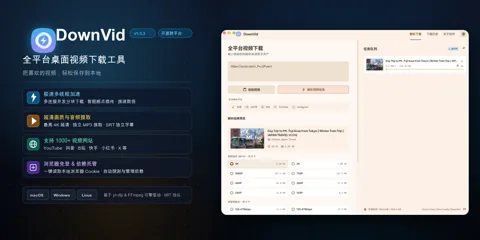
DownVid is an MIT licensed desktop app for macOS, Windows and Linux, built with Electron and Vue 3, that puts a graphical interface on yt-dlp (a command line video download tool) and FFmpeg. It is aimed at people who want to save video, audio or subtitles from sites that yt-dlp supports without typing commands. When a URL is pasted, the app lists formats from 360P to 4K, audio-only MP3 and subtitles-only SRT, and downloads run in a queue with pause, resume, retry, progress and a history of the last 100 items. Douyin and Kuaishou links first go to dedicated parsers that call each site's web API and take the stream addresses the web player uses. If that fails, the app tries a Chromium-based browser installed on the PC (Chrome, Edge or Chromium) in headless mode, which runs without a window, and finally falls back to yt-dlp. The project describes these results as watermark-free, and in the code read for this research no step was found that edits video frames to remove a watermark. Downloads through yt-dlp split HTTP requests into chunks to avoid per-connection throttling, and the acceleration document states that server-wide rate limits, permissions, signatures and DRM stay in force. A helper program written in Go finds yt-dlp and FFmpeg on the system or downloads pinned builds with SHA-256 checks, and building from source needs Node.js 22, pnpm 8 and Go 1.24 or later. In the default automatic cookie mode the app tries the cookies of installed browsers through yt-dlp and saves the cookies it reads as a snapshot file in the app data folder for reuse, and a cookies.txt file can be set by hand instead. The installers carry no code signing certificate, so Windows SmartScreen and macOS Gatekeeper warn on first launch, and by default the app checks GitHub for updates at startup. The metadata parsing step turns off TLS certificate checks in yt-dlp, and the headless browser starts with its sandbox turned off. The README states that the app contains no code for cracking or circumventing technical protection measures and that users are responsible for following laws, platform terms and copyright, and extraction can break when sites change.
License
MIT Permissive. Commercial use and changes are allowed if the copyright notice is kept.
More in this category
- SukkaW/Make-Bilibili-Great-Than-Ever-Before
Make Bilibili Great Than Ever Before is a TypeScript userscript that changes ads, tracking and playback settings when watching the Chinese video site Bilibili. It is an MIT-licensed project that rewrites a fork of Make Bilibili Great Again in TypeScript, and once installed in a userscript manager such as Tampermonkey, Violentmonkey or the AdGuard extension, it runs early in page loading on the www, t, live and space subdomains. Its 16 modules are switched on and off one by one from a menu, it intercepts the page's fetch and XHR calls to modify only the requests and responses it needs, and it makes the patched fetch look like the original browser function to checking code such as Sentry. On privacy, it blocks log reporting and user tracking requests, replaces Sentry and reporting objects with empty functions, blocks browser storage writes used for logs and reports to cut disk writes, and strips tracking parameters such as vd_source from URLs. Ad elements are hidden by shrinking them to 1 pixel with opacity 0, and a code comment explains that the display value is left unchanged because the site checks the display value of ad links to detect ad blocking. On playback, it turns off AV1, replaces the P2P and PCDN loaders and WebRTC with fake objects so official CDN addresses are used, adds a video crop mode to the player, and for live streams requests the original quality route but falls back to the quality chosen in the player after five failures within 30 seconds. The 4K module changes the player's local setting values and presents the browser as macOS Safari so the 4K, HDR and Dolby Atmos options turn on even on low-end devices, and since no code modifies the playback address responses, the quality actually received depends on the server response. Thread Ripper, off by default, splits video segments into smaller pieces, requests them from several CDN hosts at once and uses the first response to arrive, and as its module description says, it can use more bandwidth and data. It also tidies ads and layout on the home and dynamic (story) pages, lifts the no-reprint marker (unable-reprint) and copy event handling on column (/read/cv) pages so the text can be copied, and removes the site-wide grayscale effect and HarmonyOS fonts so the system default font is used. A read of the full source found that it only reads playback address responses and uses the signed addresses the site issued as they are on Bilibili CDN hosts, no code that bypasses login, paid membership or region restrictions was found, and because it depends on Bilibili's internal page structure, some modules can break when the site changes. - JimLiu/baocut
BaoCut is an AI video editing product that turns footage and editing requests into an editable timeline. It targets creators repeatedly revising subtitles, translations, dubbing, and presentation videos. Its documentation describes transcription, subtitles, speech synthesis, removal of unwanted segments, and code-based motion graphics. Outputs include MP4, subtitle files, audio, and project bundles preserving edit history. Desktop, CLI, MCP, and web surfaces are documented as sharing one local Runtime and the same editable video. Packaged apps include the Runtime and native workers, but agent features require a signed-in external engine, while ffmpeg and ffprobe must be supplied separately. Local models and online providers are available, but their files and service connections are not automatically all configured. Windows packages are unsigned, and GPU inference has not been validated on actual hardware according to the project. This is source-available software under the BaoCut Community License rather than a standard open-source license; software resale, hosting, and embedding in commercial products require separate permission. Some model licenses are non-commercial and need review independently of the application terms. - Predidit/Kazumi
Kazumi is an anime search and playback app built with Flutter that finds titles on video source sites with user-made rules and streams them inside the app. A rule is built from up to five XPath selectors and can be imported and shared, and only selectors that start with // are currently supported. Title information comes from the Bangumi open API, danmaku comments from the dandanplay open platform, watch-together from public SyncPlay servers, and image-based title search from trace.moe. Features include an airing timetable, subtitles, downloads, cross-device sync, DLNA casting, playback in external players and real-time super-resolution based on Anime4K, which demands a strong GPU. It supports Android 10 or later, Windows 10 or later and macOS 10.15 or later, Linux is experimental, and iOS 13 or later and HarmonyOS 5.0 or later, the latter from a separate fork repository, need sideloading. During playback it caches as much video as possible in memory, so a low-memory mode is available when memory is tight, and the README says ads in some titles come from the video sources. The README states that it has no user data collection and no telemetry components, and its disclaimer asks users to follow local laws, respect third-party intellectual property and delete data and cache produced by use within 24 hours. The license is GPL-3.0, and the icon is a work used with the original artist's permission, so using it requires separate permission. - storytold/effectcraft
EffectCraft is an open-source motion graphics app that reimplements the After Effects way of working in Rust, and its repository was created on 1 October 2026. It runs as a desktop app and in the browser, and it is meant for people who make animated titles, explainer videos and visual effects. It offers layers, keyframes, a Graph Editor, expressions, puppet tools and 3D cameras and lights, and the README says its 306 effects include every one of the 298 effects in After Effects. Projects are saved as versioned JSON files (.ecproj), Lottie files can be imported and exported, and built-in Rust encoders produce H.264, ProRes, HEVC, AV1, WebM, EXR and GIF without FFmpeg. Actions are collected in one command registry, so the same action can be called from the interface, the CLI, a JSON control channel and an MCP server for AI agents. The control channel is a TCP port on 127.0.0.1 with no authentication, and the documentation says to enable it only while it is in use. Scripts work only inside the project folder, writing files and using the network need a separate preference, and the README states that there is no telemetry and no network access unless requested. Installers are on the releases page, building from source needs Rust 1.95 or later, and the optional MobileSAM model of about 40 MB is downloaded separately. It cannot open .aep or .aepx files or run After Effects plug-ins, macOS is the most tested platform, and basic interaction bugs remain on Linux and Windows. The authors' gaps document puts feature coverage at about 99 percent on a checklist they wrote and graded themselves, while coverage for real professional work is still unmeasured and estimated at about 30 to 50 percent. - storytold/lightcraft
LightCraft is a Rust photo library and development application for photographers who organize and adjust images locally. It imports JPEG, DNG and several camera RAW formats, keeps originals separate from edits, and exports formats including JPEG, PNG and TIFF. Its engine processes light and color in a wide-gamut floating-point pipeline, with a GPU path and CPU fallback. Albums, ratings, search and an operation log connect photo selection with saved development settings. The desktop interface, CLI and MCP, a protocol for exposing tools to agents, share engine commands for importing, adjusting, rendering and exporting. Source builds use Rust and Cargo for macOS, Windows and Linux, while the browser build additionally needs the WebAssembly target and a matching wasm-bindgen tool. The documentation warns that camera color calibration is incomplete outside DNG, some RAW formats only expose embedded previews, and subject and sky masks use heuristics rather than learned segmentation. Its speed and CPU/GPU agreement figures are maintainer reports, not results independently reproduced here.
Only repositories in the ranked Trendshift lists are included, and the lists are used only to find candidates. We do not copy their ranks. Descriptions, licenses and star counts come from each GitHub repository. The notes are our own reading. We have not tested these projects, and a place on a trending list does not prove quality.