GanyuanRan/Autoloom
- Source
- GitHub
- First trending
- Category
- Coding tools
- GitHub stars
- 878
- Main language
- JavaScript
This page introduces an external open-source repository. It is not an HDATF product.
What it does
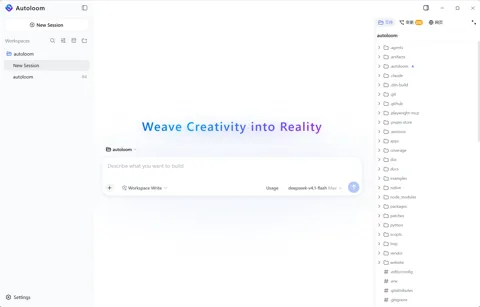
Autoloom is a free Windows x64 desktop client for AI coding that builds governance methods from the open Aegis method pack into agent execution. The methods ask at task start why a change is needed, check duplicated responsibilities and added complexity before edits, require causal diagnosis after failures and finally require a check against requirements and verification evidence. Before a project change runs, the conversation can show how these methods shaped that action, and goals, constraints and key decisions stay with the project and appear as a diff for review when they change. It is built on DeepSeek Harness dsh-v0.1.1-rc.2. The user adds a model provider, an OpenAI-compatible endpoint or a subscription sign-in and pays that provider directly. Each session uses one permission preset, read only, workspace write as the default or danger full access, and on Windows confined commands run with a restricted token and ACLs. It works with local projects and with Linux x64 projects over SSH, which need Node.js 22.19 or later and Bubblewrap for restricted commands. Default web search sends only the query to Parallel's public MCP service with Exa as a fallback, and session logs with prompts and tool results stay in the project's .autoloom folder. Getting started means downloading the latest 0.1.0-beta.2 installer, which has no code signature, from GitHub Releases, checking it against SHA256SUMS and starting with a backed-up test project. The client source is not public, installers are GitHub Release assets, and the repository holds documents, images and the project website's source under all rights reserved, while data formats may change during the beta.
License
Custom license Custom or non-standard license. Read the license file before any reuse.
More in this category
- flutter/flutter
Flutter is Google's SDK for building mobile, web and desktop app interfaces from a single codebase. Its main users are app developers and designers who want one team to build apps for Android, iOS, the web, Windows, macOS and Linux together. Developers write screens by composing widgets in the Dart language, Flutter draws them directly with the Skia and Impeller rendering engines, and it provides the Material and Cupertino widget sets. Dart code compiles to ARM machine code on iOS and Android, to JavaScript and WebAssembly on the web, and to x64 and ARM code on desktop. During development, hot reload applies code changes immediately while keeping state, FFI and platform channels call each operating system's features, and developers use pub.dev packages and the VS Code and IntelliJ plugins. The official supported platforms document (as of Flutter 3.47) lists Android API 24 to 37, iOS 15 to 27, Windows 10 and 11, macOS 12 to 27, Debian 10 to 13, Ubuntu 20.04 to 24.04 LTS, and the latest two versions of Chrome, Firefox and Edge plus Safari 15.6 or later as targets. The iOS setup document assumes Xcode and a USB connection to a Mac, so it is safest to assume a Mac is needed for iOS builds. The Flutter tool downloads resources from Google servers, installing from GitHub downloads the Dart SDK on first run, and the documentation notes that using the SDK means agreeing to the Google Terms of Service. The web FAQ describes Flutter web as a fit for app-centered interfaces such as PWAs and SPAs, and recommends HTML or Jaspr for text-heavy static websites and content where search visibility matters. The repository license is BSD-style (BSD-3-Clause). - xtool-org/xtool
xtool is a development tool that builds SwiftPM projects into iOS apps and installs them on devices from Linux, WSL, or macOS. It targets Swift developers who do not want to depend exclusively on Xcode on a Mac. Swift source and package configuration become an app through packaging, signing, and installation. It also provides device discovery, app launching, and access to Apple Developer Services. An XKit library exposes some capabilities to Swift programs. Getting started requires Swift tooling, an iOS SDK, Apple authentication, and a configured device connection. The Linux guide builds the SDK from Xcode.xip, while Windows requires WSL and USB connection setup. Authentication offers public API keys for paid developer accounts or password authentication using private Apple APIs, so account policies and security need review. Installation alone does not configure the SDK and signing environment, and complete replacement of every Xcode feature has not been established. - joshuaswarren/omarchy-apple-dev
This project provides scripts and compatibility tools for developers who want to build iOS apps from Omarchy Linux instead of running Xcode on macOS. Its inputs include Swift or SwiftUI app sources, project resources and an Apple-distributed iOS SDK. Swift and xtool produce an app bundle, while separate scripts handle USB device installation and preparation of an IPA distribution package. The inspected shipping script sequences release building, resource preparation, signing, packaging and offline validation, with upload enabled only by an explicit option. Starting requires a supported Linux machine, a matching Swift and SDK combination and an Apple ID to obtain the Xcode archive containing the SDK. Physical-device work also needs an iPhone and USB connection, while TestFlight requires a paid Apple Developer account and App Store Connect credentials. The README reports successful builds and Apple processing for selected apps, but those results were not reproduced in this review. It also distinguishes older device-debugging evidence from the newer toolchain and describes Linux-only wireless deployment limits, so this should not be treated as universal Xcode compatibility. - nykooi1/vibe-wise
A Claude Code plugin for learning while building software. It asks users for their approach before implementation, discusses tradeoffs and explains code changes afterward. - tester-army/e2e
An end to end testing framework for web and mobile apps. A test describes a goal in natural language and an agent drives the app to reach it, while locators and assertions check the result inside the same test. An agent step that a later assertion verifies is recorded, and the next run replays it with no model calls until the app changes.
Only repositories in the ranked Trendshift lists are included, and the lists are used only to find candidates. We do not copy their ranks. Descriptions, licenses and star counts come from each GitHub repository. The notes are our own reading. We have not tested these projects, and a place on a trending list does not prove quality.