nyacg/do-on-container
- Source
- GitHub
- First trending
- Category
- Other
- GitHub stars
- 10
- Main language
- TypeScript
This page introduces an external open-source repository. It is not an HDATF product.
What it does
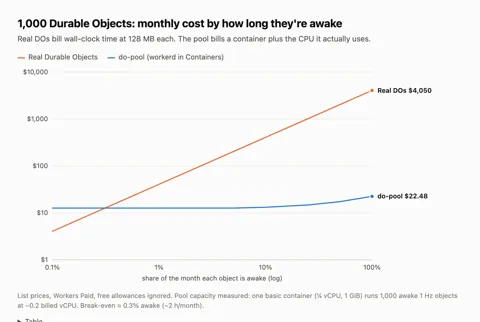
do-pool is a TypeScript experiment in the repository do-on-container. It runs the same Cloudflare Durable Object classes either as real Durable Objects or hundreds per container inside workerd on Cloudflare Containers. It targets objects that stay awake but do little, such as game loops, presence, upstream feeds and AI agents waiting on models, which are billed for every second they stay awake. In POST.md, 1,000 such objects cost about 22 dollars a month in the pool and about 4,050 dollars as real Durable Objects, and objects that mostly hibernate are said to fit real Durable Objects better. A placement object assigns objects to containers, scales nodes from CPU and connection statistics, moves several objects at a time off busy nodes and uses per-assignment epochs against stale moves. Every 30 seconds each node writes all changed objects as one R2 segment plus a manifest, and on SIGTERM the node saves everything first. On a hard failure up to 30 seconds of writes can be lost, and in the write-up's SIGKILL test 5 of 10 writes survived while all 10 survived a drain. Container location cannot be chosen, and in the write-up's browser measurement pool round trips took about 80 ms against about 20 ms for real Durable Objects. Running it needs a Cloudflare account and API token, an R2 bucket and Docker to build the linux/amd64 image, and status endpoints are public while only admin calls need a token. The write-up is marked as a draft, the repository has no license file, and the two demos are live cursors and a Yjs collaborative editor.
License
No license No license file found. Without a license, reuse of the code is not permitted by default.
More in this category
- chenglou/handwired
Handwired is an MIT-licensed TypeScript project that writes program logic in the form of a neural net. A program is a fixed list of operations over 32-bit floats, mostly weighted sums and ReLU products plus 0-or-1 rounding and table reads, and its weights are written by hand without training. The README presents it as turning regular JavaScript into a neural net. The docs state that no tool converts existing JavaScript source, and programs are written in builder code that appends operations to a Circuit. An if-else becomes arithmetic in which both branches are computed and a value of 0 or 1 picks one, and the README says this keeps the whole program differentiable, while the docs require explicit gradient options for rounding and table reads. The program reads one Float32Array of cells, and host JavaScript writes inputs into it, runs an evaluation, copies the next state back and draws the results in the DOM. Programs run in JavaScript on the CPU, and only the JSON search demo turns them into WebGPU shaders to search 100,000 generated JSON documents at each keystroke. The demos are HandwiredOS, with three windows and a dock run by one program, a photo gallery whose layout network is trained with the program's gradients, and the JSON search page. Getting started needs Bun, with 1.4.3 as the tested version, where bun install and bun start open the demo site and a toggle switch template is the start of a new app. The lab status page lists known issues such as gradients that change with the order of code statements, and the lab folder holds older experiments. - ahwootech/BRUTAL
BRUTAL is a C# framework from Ahwoo for making games or a custom game engine. According to the README, Kitten Space Agency was built directly on it, and Ludeon built its Waylith engine on it to move RimWorld off Unity. Its core is an interop layer that calls native APIs directly from C#, surrounded by unmanaged memory, allocation-free collections, maths, a job system, logging and localization. Bindings cover Vulkan, OpenGL, GLFW, SDL, Dear ImGui, FMOD, OpenAL, RakNet, Jolt, Box2D, shader compilers and more, and a separate C# library loads glTF files. It has no editor, scene graph or renderer, and each top-level folder is one NuGet package so that a project references only what it needs. Getting started needs the .NET 10 SDK on Windows or Linux and a Vulkan 1.3 GPU for rendering, and the README's first example opens a window with the Core and Glfw packages. Project files, a solution and build scripts are still to come, so the repository is for reading and forking and builds use the NuGet packages. The license is based on MIT and is free for commercial games, and a separate commercial license can be arranged. A product distributed to end users must put the BRUTAL copyright notice in its credits and ship NOTICE.txt, and it shows the logo before its main function starts unless that is waived, as for non-profit projects or products without graphics. The license has yet to be submitted for OSI approval, it follows New Zealand law, and third-party components such as FMOD keep their own licenses. - HeyPuter/everything
Everything is a monorepo (one repository that holds many apps) from Puter Technologies, the HeyPuter organization on GitHub, that gathers browser apps meant as open-source alternatives to commercial software. Its README sets the goal of recreating free alternatives to all proprietary software, from Office to AutoCAD, and at the checked commit it lists 50 apps in nine groups, such as a spreadsheet, tasks, team chat and CAD. Each folder under src that has a package.json (49 of the 50) is a separate web app with its own Vite build, mostly plain JavaScript without a frontend framework, and each app is installed and deployed on its own with Node.js and npm. Puter is the backend, as 45 of the 49 app pages load the Puter.js SDK from js.puter.com and save documents, settings and attachments in the signed-in user's own Puter cloud. The Calendar README calls this a user-pays model in which each user's data is stored in and billed to that user's own account. Puter storage is kept separately for each account, so shared use in apps such as Teamchat and Wiki deploys a Puter worker into the owner's own Puter account, and members read and write through that worker. Some apps add AI features through Puter AI on the user's account, for example turning an email signature into a contact, reading receipts, and a design assistant in the Parametric 3D CAD app that runs on Claude models. Saving data in the published apps needs a Puter account, and developers can try many apps without an account through an in-memory Puter mock page or a local mode that works only in development builds. Maturity varies by app, as 12 apps, including CAD, Legal and Parametric, describe themselves as alpha or early alpha, and several of them warn that data could be lost. Planned and present parts also differ, as the Assets folder holds only a README describing an asset manager, a page file, icons and build settings, the Building Design folder holds only icons, and the Try it link of 7 apps points to a note that the README lacks. The repository was created on 2026-10-13 under the MIT license with Puter Technologies as copyright holder, and bundled third-party parts such as SheetJS Community Edition (Apache-2.0) follow their own licenses. The Spreadsheet README says its production page sends page views and four usage events to Plausible analytics, with file contents and account identifiers left out of the event data. - bherbruck/solidcraft
SolidCraft is a parametric 3D CAD application written in Rust for people who design mechanical parts, in which constrained sketches, a feature timeline and parameters rebuild the model when a dimension changes. It also covers assemblies and sheet metal, saves designs as .solidcraft files and exports to STEP AP242, STL, URDF for robot simulators and other formats, and imports STEP and IGES files as a base feature that later features build on. The desktop app, the browser build, the solidcraft-cli tool and an MCP server (a protocol that lets AI agents call tools) run the same command list, and the MCP server runs headless or drives a running app. By default the server reaches files only in the open design's folder inside the home folder, its recovery folder and folders given with --allow-path, while --allow-any-path removes that limit. Release builds exist for Windows, macOS, Linux and the web, but the downloads have no signature yet so Windows and macOS show warnings on first launch, and building from source needs Rust 1.95 or later. Agent use is a separate step that adds solidcraft-cli mcp to the MCP client's settings, and the three Agent Skills for modeling, editing and checking are an optional extra that is copied into the agent's skills folder. The checking skill lists problems SolidCraft lets pass without an error, such as parameters with no range enforcement and a boolean retry that can leave wrong geometry with only a warning line. The README describes the state as early but usable for simple parts, and the generated reference test page reports all 81 public parts matching analytic or FreeCAD-computed volume, area, centre of mass and bounding box. The README gives 75 of 76, and these checks cover only the measured values, so full geometric and workflow equivalence remains unconfirmed. The Korean interface catalog is partial, and the font bundled with the web build covers Japanese, so Hangul display in the browser remains follow-up work. The repository is in the personal account bherbruck, separate from the storytold organization that publishes the other Craft apps, and SolidCraft was not found in the app lists of the storytold READMEs read for this research, so a formal tie with storytold could not be confirmed. The license is MIT or Apache-2.0 at the user's choice (Apache-2.0 in the GitHub field), and the geometry kernel builds on the open-source truck crates (Apache-2.0). - Saffsanity/sill
Sill is an Apache-2.0 licensed pair of apps, one for the Mac and one for iPhone and iPad, that shows one Mac window or the whole desktop on the device and lets the user operate it there with touch, a trackpad, a keyboard or Apple Pencil. Sill for Mac is a free notarized download (checked by Apple for distribution outside the App Store) from getsill.app, and Sill for iPhone and iPad is free on the App Store. When a device picks a window, Sill for Mac captures it with ScreenCaptureKit, encodes it as HEVC with VideoToolbox and sends it over TLS 1.3 on TCP, and capture runs only while a device is connected. When the encoder or the link falls behind, Sill for Mac drops frames instead of queueing them, and the device shows each decoded frame at once so the picture stays current. Taps, clicks, scrolls, keys and Apple Pencil input become mouse and keyboard events on the Mac through the Accessibility permission, and three-finger gestures run features such as Mission Control. Devices find the Mac with Bonjour on the local network or connect over a USB cable, and Remote Access, off by default, lets paired devices also connect from other networks through the user's own VPN or a router port forward to TCP port 7455. Each device pairs once with a QR code or a 12-digit code shown on the Mac (automatically over the cable), after which every connection accepts only the keys exchanged when pairing, and the Mac keeps its keys and the paired-device list in its keychain without iCloud sync. There is no account and no relay server, and the only request beyond the user's devices is Sill for Mac's once-a-day update check, which sends its version number to GitHub and can be turned off. The Mac must be an Apple silicon model on macOS 14 or later with the Screen Recording and Accessibility permissions, and macOS 15 or later also needs the Local Network permission. The iPhone or iPad needs iOS or iPadOS 17 or later with Local Network and camera access, and building from source needs Xcode 27 (Xcode 27.1 for the iPhone and iPad app). Limits listed in the docs are one window or the desktop at a time, picture without the Mac's sound, a brief black frame when a window is resized, and stalls after a lost packet because the transport is TCP. The docs also note that with Require pairing turned off any device on the network can connect (still encrypted), and that Sill for Mac 0.3.1 and earlier had no encryption or pairing on home connections.
Only repositories in the ranked Trendshift lists are included, and the lists are used only to find candidates. We do not copy their ranks. Descriptions, licenses and star counts come from each GitHub repository. The notes are our own reading. We have not tested these projects, and a place on a trending list does not prove quality.