nickrunning/wechat-selkies
- Source
- GitHub
- First trending
- Category
- Workflow
- GitHub stars
- 4,330
- Main language
- Python
This page introduces an external open-source repository. It is not an HDATF product.
What it does
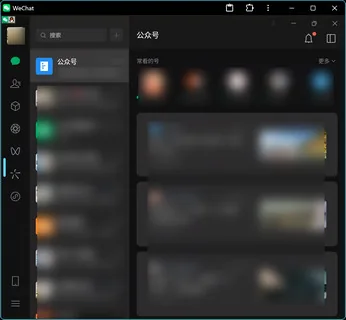
WeChat Selkies packages the official Linux WeChat client and optionally QQ inside a Docker container for browser access. It targets people who need a remotely accessible messaging desktop rather than another local client installation. Selkies streams the desktop through WebRTC and passes browser interaction to the applications, so this is not a replacement messaging protocol or business API. The documented desktop includes Chinese input support, file transfer and persistent configuration and chat data. Telegram is an optional third party application installed through the desktop's application facility, not a guaranteed bundled client. Operation requires a Docker host, a compatible browser, storage and access to the original messaging services with valid account authentication. The inspected automatic login helper presses a visible login button and asks for phone QR authentication when required; it does not establish a verification bypass. Although the LICENSE file says MIT, the README limits use to personal research and prohibits commercial use, while the Docker image label says GPL-3.0-only, so the terms are inconsistent. This review read documents and configuration without running the container, and public exposure, account safety, backup behavior and the conflicting usage terms remain unverified.
License
MIT Permissive. Commercial use and changes are allowed if the copyright notice is kept.
More in this category
- BrOrlandi/whatsapp-mcp-local
WhatsApp MCP Local connects WhatsApp conversations on a personal computer to AI tools. It accepts conversation and message identifiers, periods, recipients, and text for lookup, export, and sending operations. The connected AI interprets retrieved data rather than the app itself producing summaries. A resident process manages unofficial wacli synchronization and stores messages in local SQLite. Source also includes recipient-candidate handling and a draft check that does not send. It needs a WhatsApp account, phone pairing, a running computer, and an AI tool supporting MCP. Audio transcription can use a local model, a compatible remote server, or an external provider. Remote transcription sends audio to that server. Limitations include account restrictions from unofficial access, expired historical media, and local transcription issues on some Windows systems. Local storage alone does not prevent access by other local programs or transmission to the AI provider. - m1guelpf/Exo
Exo is a Gmail client for macOS users who want a local desktop mail interface. It reads Google mail, calendars and contacts and sends requested changes back through Google APIs. Inspected code opens a SQLite cache for each account. A synchronization module applies Gmail history and rebuilds expired history while preserving queued changes. An outbox records user changes, waits for server acknowledgment and handles retries or rollback of local display changes. Authentication uses the system browser and a local callback rather than an Exo account server. Setup requires a personal Google sign-in client and enabled Gmail, Calendar and People APIs, with default sign-in requesting mail modification and sending, mail settings changes, calendar management, contact and organization directory reading, and account identity access; refusing any requested permission fails sign-in, while calendar-only accounts request only calendar access and the email address. Local storage does not remove dependence on Google, and the author warns that generated code has not received human correctness or security review. - SonicloudTech/mouse-mcp
uMouse MCP connects AI agents to Windows mouse control through a dedicated USB device. It accepts device identifiers, screen coordinates, and actions such as clicks and drags, returning delivery status and position information. Optional voice input sends audio through the selected recognition path to obtain a transcript. The shared-v2 source path controls hardware through a shared service and native host. Task-level ownership and request identifiers manage interference and duplicate processing. It requires Windows x64, Node.js, compatible uMouse hardware, and firmware; an ordinary USB mouse is not a substitute. The public MCPB package and shared-v2 source do not contain identical capabilities. Voice options in the public package must also be distinguished from cloud and custom-server options in source. Successful input delivery does not establish task success in the target app, so visual verification and real hardware testing remain necessary. Server code and the native SDK also have different usage terms. - SonicloudTech/mouse-sdk
This repository distributes an SDK for connecting compatible smart-mouse buttons and audio to applications. For hardware makers and app developers, it accepts USB HID and BLE data and delivers button events, JSON device state and PCM audio. A public C ABI supports multiple languages, while custom hardware protocols require adaptation through RAW mode. The inspected header and C sample show callback registration, initialization, event reception and shutdown. Documentation requires copying callback data within its lifetime and moving slow work to a separate processing flow. Use needs compatible hardware and binaries and companion libraries matching the operating system and architecture. Public downloads target Windows x64 and macOS ARM64, with other platform packages obtained separately. Full SDK internals are not published, the MIT samples do not license all binaries or proprietary protocols, and applications must implement speech recognition and business actions. - rustrak/rustrak
Rustrak is an observability tool for development teams that want application errors and execution traces on their own server. It accepts errors, logs, transactions and AI agent traces from Sentry SDKs and displays them in a dashboard. Its architecture documentation separates ingestion from database processing, temporarily storing accepted data before background processing. The inspected ingestion route checks authentication, input format and quotas before handing data to a processing pipeline. SQLite is the default storage, with a PostgreSQL configuration also available. Operation requires a server, persistent storage, project DSNs and access controls. AI tracing covers model and tool calls and token counts, but the project explicitly omits spending calculations based on its own price table. This review did not execute SDK compatibility or throughput tests, so actual environment events remain necessary for validation.
Only repositories in the ranked Trendshift lists are included, and the lists are used only to find candidates. We do not copy their ranks. Descriptions, licenses and star counts come from each GitHub repository. The notes are our own reading. We have not tested these projects, and a place on a trending list does not prove quality.