felipebasurto/unslop-ui
- Source
- GitHub
- First trending
- Category
- Skills
- GitHub stars
- 176
- Main language
- HTML
This page introduces an external open-source repository. It is not an HDATF product.
What it does
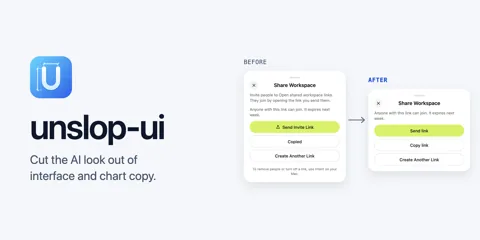
unslop-ui is an explicitly invoked agent skill for removing redundant interface copy and decoration from pages, dashboards and charts. Its users give a coding agent a file, folder or component, or let it inspect files changed in the conversation. The skill combines written editing rules with a Python regular-expression counter that reports candidate patterns and source locations before and after editing. It targets repeated subtitles, explanatory filler, decorative numbering, static status badges and chart clutter while preserving visible form labels, accessible names and elements driven by real state. Its output is an edited interface plus a report of rewrites, deliberate exceptions and unresolved decisions. Optional surface rules also constrain gradients, spacing, font weights and motion without selecting a new layout or visual identity. The standard skill requires an agent environment and Python without additional packages, while the instruction-only Claude Code plugin uses search patterns instead; external pstack writing rules are optional because a fallback is bundled. The counter cannot understand all copy or distinguish every legitimate status indicator, and the evaluation fixtures specify desired behavior rather than proving universal editing safety.
License
MIT Permissive. Commercial use and changes are allowed if the copyright notice is kept.
More in this category
- abdiraimov-otabek/dashboard-design-skill
Dashboard Design is a Markdown skill that guides coding agents in building, redesigning and reviewing data-heavy interfaces. It takes a dashboard goal, metrics, problem thresholds and existing screens as working material, and guides production of an interface or a prioritized critique. Its workflow first defines the question and expected answers from a fixed dataset, then selects visual forms, layout and shared design tokens. References cover KPI cards, charts, heatmaps, targets, ranked lists, date filters and loading, stale, empty and error states. The skill connects problems visible in the data with nearby actions and keeps explanatory prose mainly in tooltips rather than repeating it under every metric. A dedicated quality checklist independently checks totals, comparison windows and consistency before examining screenshots at wide, laptop and phone widths. Web examples use React and Tailwind patterns, while another reference covers SwiftUI and Swift Charts with device and accessibility checks. This is an instruction and reference package rather than a data service or a guarantee of usable output, and its preference for nearly sentence-free screens still requires judgment for the audience and accessibility needs. - NVIDIA/SkillEvaluator
SkillEvaluator checks agent skills, meaning folders of task instructions and supporting files, and evaluates their contribution to task outcomes. Tier 1 checks structure, quality, security and related static properties. Tier 2 uses embeddings to find repeated guidance within a skill and overlap across a supplied skill catalog. Tier 3 runs an agent on the same cases with and without the skill through the Harbor evaluation framework. Reports compare the two conditions and retain coverage and incomplete evidence rather than treating missing checks as passes. The inspected comparison implementation uses shared scored cases for each metric and excludes cases judged by different models for judge-based metrics. Static quality alone does not establish safe execution or a benefit in live tasks, and a generated starter case has limited coverage. Live evaluation needs model access and an execution environment and may incur charges; the project describes its support level as experimental. - google-labs-code/stitch-skills
This repository packages agent instructions and helper scripts for Google Stitch. It follows the Agent Skills format and separates design, build, and utility plugins. The workflows cover generating and editing screens from text or images. Another workflow extracts standalone HTML and design rules from existing frontend code before uploading them to Stitch. Build skills describe converting Stitch screens into React or React Native components. The React workflow separates component code, hooks, mock data, and visual tokens. Its supplied syntax-tree validator checks for a Props interface and hardcoded hexadecimal colors in class attributes, not every architectural rule in the instructions. These workflows depend on configured Stitch MCP access and credentials, and the README states that this is not an officially supported Google product. - arjun988/blender-skills
Blender Skills is a collection of task instructions and references for coding agents that work with Blender, rather than a standalone 3D generation model. It addresses the need to carry an artist's request through modeling, materials, lighting, optimization, and export without treating each step as an unrelated question. Inputs include a text brief, a reference image, the target engine, and polygon and texture budgets. The blender-director instruction selects specialist skills and defines a production brief before scene operations begin. Execution relies on the separate BlenderMCP addon and MCP server, with MCP meaning the interface through which an agent calls external tools. The intended outputs are Blender scene changes, rendered checks, exported assets, and a validation report, while reference matching uses camera alignment and repeated screenshot comparison. The setup guide lists Blender 3.0 or later, Python 3.10 or later, uv, a running addon connection, and a compatible agent client as prerequisites, and the checked configuration connects to localhost port 9876. Quality depends on the agent and connected tools rather than the instruction files alone, and arbitrary Python execution in Blender requires backups and restricted permissions. - tradermonty/claude-trading-skills
Claude Trading Skills organizes investment research and trading review for individual investors who have limited time. It addresses fragmented market checks, risk review, trade planning and journaling rather than delegating investment decisions to AI. Users supply public market CSV files, chart images, local records or data from integrations such as FMP and Alpaca. Skill instructions and Python helpers turn these inputs into market reports, position sizing calculations and structured investment records. YAML workflow manifests specify the skill order, required artifacts and decision gates. The trader-memory-core skill keeps thesis histories in local YAML files and produces postmortem reports. A starting workflow reviews market breadth and uptrend participation before a human reviews the resulting exposure posture, with no paid data API required for the basic path. It runs through Claude Skills or Claude Code, has workflow-specific Python and integration requirements, and is neither an automated order platform nor a guarantee of profitability.
Only repositories in the ranked Trendshift lists are included, and the lists are used only to find candidates. We do not copy their ranks. Descriptions, licenses and star counts come from each GitHub repository. The notes are our own reading. We have not tested these projects, and a place on a trending list does not prove quality.