ccch1mneyyy/dsh-Go
- Source
- GitHub
- First trending
- Category
- Agents
- GitHub stars
- 9,503
- Main language
- Dart
This page introduces an external open-source repository. It is not an HDATF product.
What it does
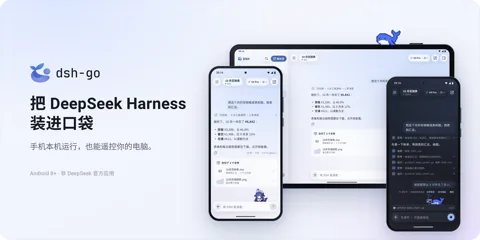
DSH Go is an unofficial Android client for using DeepSeek Harness conversations and work. It can run the engine inside a phone environment containing Ubuntu, Node.js and DSH, or connect to a computer's engine through SSH or DSH Remote. It passes text, images and voice input and displays answers, tool approval requests and work status. Running the engine on a phone does not mean running the language model there, since model requests go to the configured provider. Android 8 or newer and an appropriate 64-bit package are required, followed by separate local-runtime or remote-host setup and model credentials. Phone screen control requires the local engine and additional permissions, while the documentation says sensitive actions such as payments and passwords return to the person. DSH Remote limits non-image attachments, the in-app web mode, DS Bot and conversation-log export, so capabilities vary by connection. Screen information may reach the model and anonymous usage statistics are enabled by default, making privacy settings important. The application identifies AGPL-3.0 and the SDK and examples identify MIT, but names and mascots have separate terms, so code and visual assets must be treated separately.
License
AGPL-3.0 Network copyleft. Offering a modified version as a service also requires releasing the source. Review before any product use.
More in this category
- deepseek-ai/dsh-superagent-prototype
dsh-superagent is a research prototype for handling team development requests in one GitHub repository through DeepSeek Harness. The repository states that it is not an official DeepSeek product or production-ready software, and some directions described in the paper are not implemented. It receives GitHub messages and optionally Feishu messages, turns authorized requests or rule-matched work into Tickets and processes them in separate sessions and directories. Results such as pull requests return to the original conversation, while a web panel highlights work needing human attention. Explicit requests are separated from inferred candidates, and the default observe mode does not accept inferred candidates as actual work. Setup requires a dedicated Harness profile, an agent GitHub user account, an authenticated gh CLI, a model provider and workspace configuration. The deployment guide requires Node.js, pnpm, git, Python and tmux, with a separately configured bot for Feishu. GitHub Enterprise Server is unsupported, and account wrappers do not isolate processes, so operating-system privileges and secret exposure require separate controls. - wangzan101/Mika
Mika is a personal Android assistant that turns natural-language requests into app and web operations and shows results with execution history. It opens apps on a separate background display and reads interfaces through accessibility data, OCR and an optional vision model. Its built-in browser reads web material and handles files, while supported devices provide a Linux sandbox per conversation for computation and document processing. Installing the APK alone does not enable phone control; debugging pairing, permissions and a tool-capable model connection must be configured. Installation requires Android 11 or later, phone-app tasks require Android 13 or later, Android 14 is recommended, and the sandbox is arm64-only. Models connect through separate APIs or supported login flows, and screen content can reach the selected provider, so on-device execution does not mean fully offline processing. Login and verification challenges are handed to a person, but the default asking mode does not request approval for every message send or deletion. Autonomous mode also reduces payment-related confirmation, a distinction that matters for business accounts. This is a public beta with device compatibility limits, protected-screen visibility limits and third-party terms or account-restriction risks. - zzp1221/Research-Assistant-Agent
Research Assistant Agent is a multi-agent research execution prototype for researchers reproducing papers, evaluating datasets and exploring candidates within a budget. Inputs are natural-language research goals, papers or attachments, repository addresses, datasets and resource constraints. A planner builds a dependency graph, meaning a plan with explicit task prerequisites, and a scheduler dispatches specialist agents with approval, retry, cancellation and budget handling. Outputs include experiment artifacts, metrics, environment manifests and links between individual claims and evidence, with separate outcomes for completed, partial, minimal-check, blocked and review-needed work. It also exposes literature search, page-based document retrieval, REST interfaces and live execution events to a React workbench. The main implementation combines a Go backend, a separate sandbox service and a Python optimizer, and the documented Compose setup requires Docker and an OpenAI-compatible model endpoint and key. Starting through that setup requires configuring service authentication and model access before opening the workbench, rather than merely opening a static page. Older root instructions say the backend is Linux-only, while the newer desktop section and desktop README describe a Windows Wails shell, native sandbox support and cross-builds, so native Windows readiness cannot be treated as settled from the overview alone. It remains a research prototype with limited production authentication and incomplete public raw verification logs. The verification document still lists claim-rubric parsing and paper-metadata extraction defects, and successful minimal runs or offline framework baselines are not full paper reproduction or real framework performance evidence. - CopilotKit/OpenBot
OpenBot is a beta AI-coworker platform template intended for companies to adapt and operate in their own environments. Rather than a finished hosted service or model, it supplies a React interface, API server, PostgreSQL, browser computers and AG-UI agent connections. Conversations and task requests flow to agents and onward to browser or file operations, result interfaces and audit records. The server gateway is designed to resolve targets, evaluate policy, write an audit record and only then forward permitted actions. Deny rules take precedence in the policy engine, but the shipped startup policy permits everything, so installation alone does not establish restrictive business permissions. Setup needs Docker, Bun, database and encryption configuration, separate model credentials, and a configured CopilotKit Intelligence connection and entitlement. Conversations and memory integrate with Intelligence, while app connectors and MCP tools require their own credentials and grants. Default single-user mode treats requests as one administrator, so authentication, roles and network isolation must be configured before others gain access. Browser logins and components controlling Docker require protection, and operators remain responsible for completing and validating the template for actual business use. - modelflare-ai/AnyModelBot
AnyModelBot is a local-first assistant application for people who want persistent bots with separate personas, workspaces, models and memory. Instructions and files arrive through its desktop or local web interface and supported messaging channels, and outputs include replies, files, command results and desktop actions. A Node.js backend stores conversations in SQLite, keeps scoped Markdown memory and runs agent sessions through DeepSeek Harness with a bundled model gateway. Background tasks and scheduled rules have their own state, budget handling and a queue for questions or approval requests. Read-only, workspace and full-access presets define different execution authority, while optional desktop-action approval is distinct from file permissions. Users start with a desktop package and Modelflare authorization or an API key, then choose a model and optionally connect messaging or supported data accounts. Windows, macOS and Linux are documented, but computer control requires a desktop session, macOS control is beta, and arbitrary user-added MCP connections remain on the roadmap. Local storage does not mean offline inference: selected context, tool results and screenshots travel through Modelflare to model providers, while scheduled work also depends on the host remaining available.
Only repositories in the ranked Trendshift lists are included, and the lists are used only to find candidates. We do not copy their ranks. Descriptions, licenses and star counts come from each GitHub repository. The notes are our own reading. We have not tested these projects, and a place on a trending list does not prove quality.