JuneYaooo/rea-video
- Source
- GitHub
- First trending
- Category
- Media
- GitHub stars
- 996
- Main language
- Python
This page introduces an external open-source repository. It is not an HDATF product.
What it does
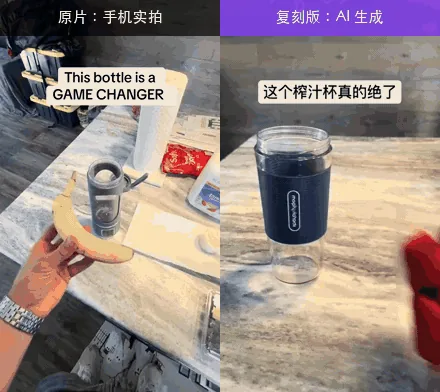
This CLI and agent skill help video makers understand a reference video's production methods and editing structure shot by shot. A video file is split into shots and examined for frames, subtitles, speech, music and other evidence. Outputs include explanations, remake routes, extracted images, and HTML and JSON reports. It distinguishes filmed, AI-generated, code-rendered and mixed footage, but classifications can be wrong. Optional video-model analysis or review by an image-capable agent supplements the basic tools. Python 3.10 or newer and ffmpeg are required, and initial analysis downloads an audio-separation model. External video models require separate API configuration, with failures identified in the report. AI-shot regeneration needs a separate capsule-cinema connection; automatic Remotion project generation for code shots and automatic quality scoring are not complete. Compression and recordings of real screens can mislead classification, and rights to footage, music and likenesses must be checked separately.
License
Apache-2.0 Permissive, with a patent grant. Commercial use is allowed; keep the notices and state your changes.
More in this category
- mromidev/claude-animated-shorts
Claude Animated Shorts is a Claude Code skill and source template for making short vertical animated stories. It starts from a topic and verified facts, then organizes a script, narration with word timings, shots, characters, camera motion and sound into a video workflow. The visual approach places flat illustrated characters in a three-dimensional world rendered locally with three.js inside Remotion rather than using an AI video generator. The repository includes a bridge story example, rendering effects, Python sound synthesis and mixing helpers, and tools for still-image and frame inspection. Outputs described in the workflow include a vertical MP4, an audio mix, separate sound stems and inspection materials. Starting requires a separately prepared Remotion project, Node, Python and ffmpeg, and the templates need their expected model assets, narration audio and timing data. Voice generation or transcription can be supplied separately, and the repository is not a complete application with every asset and dependency bundled. The example has English narration and no captions, so other language workflows need adaptation, while the code and documentation are MIT and the reference frames are designated for style study only. - aaitor/skill-video-studio
Video Studio is a local production workspace for developers preparing product demonstrations with a Claude Code skill. Its inputs include a product URL, audience, message, timed scenes and brand assets recorded in a project brief. Playwright captures real browser interactions, HyperFrames composes titles and chapters around the footage, and FFmpeg produces master and web video copies. The workflow also provides thumbnails, contact sheets and media metadata inspection, with optional music, narration and subtitles. The included Acme walkthrough supplies a local demonstration app and capture and composition sources, whereas the short README demo only shows planning before capture or rendering. Planning starts with authenticated Claude Code in the full workspace; production additionally requires Node.js 22 or later, Python helpers, Chromium and FFmpeg. Narration needs a separately configured speech service, and presenter animation can require an additional GPU host and software. The pipeline was developed on Linux, portrait output remains planned, and local production still requires visual review and sanitized capture data rather than relying on offline checks alone. - JiaFeiMiao-K-Cat/DiscImageStudio
Disc Image Studio is for users who want burning a disc to create a pattern visible on its surface, rather than print a label. It takes an image and optional accompanying files and converts them into data constrained by the physical recording formats of CD, DVD and single-layer BD-R. Its design workspace supports image layers, tone adjustments, previews and calibration. Outputs include CD audio tracks in WAV with CUE or RAW, and disc images such as ISO for the corresponding media. Separate media modules share a command and job interface, while experimental direct burning connects to a recorder through Windows IMAPI2. The Windows desktop interface supports design and burning, and the experimental Linux and macOS command-line packages generate images offline without a cloud API. The documented starting path is to obtain the matching release, select a disc type, import an image and inspect the preview before export. Visible results depend on the medium and recorder, and direct burning is experimental and can waste a blank disc if interrupted. - anomalyco/hex
Hex is a local voice-dictation desktop app for people entering text into applications on macOS, Windows, and Linux. Users hold a shortcut, speak into the microphone, release it, and receive recognized text pasted into the active app. The first use downloads a speech model, and ordinary transcription runs on the device through its Rust engine. Context-dependent processing can include correction and optional OpenCode rewriting, so the local-transcription claim should not be extended to every connected processing service. A separate TypeScript SDK accepts host-supplied PCM WAV and returns transcript text and duration through an authenticated local native helper. The SDK host owns recording, permissions, and consent, and should use the Node or Electron main process rather than an untrusted browser renderer. Users start from a platform download, while embedded SDK use requires Node.js 20.3.0 or newer and an explicit native executable because a bundled helper is not yet published. The Windows document says the current Rune interface has not been physically validated and its local transcription API is unavailable, so its platform boundary must be reconciled with the SDK guide. Windows is described as beta, SDK-controlled desktop capture is currently macOS-only, audio requests have size and duration-related limits, and the MIT source license does not establish the terms of every speech model. - aoguai/LiYing
LiYing automates ID photo postprocessing for photo studios using a single-person portrait as input. It produces resized electronic photos and printable layouts with configurable backgrounds, spacing, and crop lines. Its Python pipeline combines YOLOv8 pose detection, YuNet or RetinaFace face detection, and RMBG background segmentation through local ONNX models. Shoulder keypoints guide angle correction, while face size and top margin guide cropping. CSV files define photo dimensions, resolution, colors, and file-size limits, with optional compression and skin retouching. Users can work through a command-line interface or Gradio browser interface, and Docker configuration is included. Starting requires separately obtained model files and Python dependencies, with compatible CUDA and cuDNN needed only for optional NVIDIA acceleration. Complex photographs are outside its intended input, transparent PNG saving skips target-size compression, and the AGPL-3.0 code license does not settle the separate model licenses.
Only repositories in the ranked Trendshift lists are included, and the lists are used only to find candidates. We do not copy their ranks. Descriptions, licenses and star counts come from each GitHub repository. The notes are our own reading. We have not tested these projects, and a place on a trending list does not prove quality.