andyhuo520/digital-human-koubo
- Source
- GitHub
- First trending
- Category
- Media
- GitHub stars
- 698
- Main language
- TypeScript
This page introduces an external open-source repository. It is not an HDATF product.
What it does
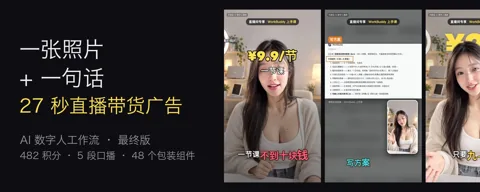
This repository combines agent instructions and scripts for making a talking-presenter video from an authorized photograph and a script or content request. It targets creators producing explainers, tutorials and product introductions, with an edited MP4 as the final output. Presenter references, voice descriptions and prompts are stored in persona.json, while build_tasks.py turns a script into generation-task JSON with estimated duration, resolution and credits. The documented workflow asks for approval of the quote and the first generated segment before generating the rest through Renoise MCP. That script prepares task data and does not itself enforce approval or submit generation requests. Subsequent steps compare whisper transcripts with the script, inspect sampled frames, clean up voices and edit captions and visual elements in Remotion. A complete run needs a skill-capable agent, a Renoise account and remote MCP access, plus local Python, Node, ffmpeg and whisper tooling. The text-behind-presenter effect additionally depends on macOS Apple Vision, so the same effect is not available through that path on every operating system. Account-specific reference materials must be replaced, generated speech and imagery need checking, and faces and voices require permission and AI disclosure. External generation costs and third-party rendering terms must be checked separately; published demonstrations and author-reported accuracy do not establish identical results in another environment.
License
MIT Permissive. Commercial use and changes are allowed if the copyright notice is kept.
More in this category
- aoguai/LiYing
LiYing automates ID photo postprocessing for photo studios using a single-person portrait as input. It produces resized electronic photos and printable layouts with configurable backgrounds, spacing, and crop lines. Its Python pipeline combines YOLOv8 pose detection, YuNet or RetinaFace face detection, and RMBG background segmentation through local ONNX models. Shoulder keypoints guide angle correction, while face size and top margin guide cropping. CSV files define photo dimensions, resolution, colors, and file-size limits, with optional compression and skin retouching. Users can work through a command-line interface or Gradio browser interface, and Docker configuration is included. Starting requires separately obtained model files and Python dependencies, with compatible CUDA and cuDNN needed only for optional NVIDIA acceleration. Complex photographs are outside its intended input, transparent PNG saving skips target-size compression, and the AGPL-3.0 code license does not settle the separate model licenses. - lemomo-ai/lemo-opuscar
Lemo-Opuscar is a style library, production toolkit and agent skill for making short films with code rather than a video-generation model. A creator supplies a topic, style and any owned materials, then a coding agent develops scenes, a timeline, narration, music and an exported film. The technical guide describes deterministic Canvas or WebGL pages captured frame by frame in a headless browser, with speech and sound mixed and muxed through ffmpeg. The plugin manifest is an entry point to those guides and tools, not a standalone renderer that starts producing films immediately after installation. The documented environment requires Node 20 or later, ffmpeg and Python 3.11 or later, with browser packages, speech models and assets added as needed; Windows use is directed to WSL. English narration can use local Kokoro, while the documented Chinese Edge TTS path needs network access. The author tunes the styles for Claude and warns that other models may not reproduce them reliably, so output still needs visual, sound and factual review. Code and documentation, demo films, third-party assets and several excluded voice tracks have different reuse conditions that must be checked separately. - anomalyco/hex
Hex is a local voice-dictation desktop app for people entering text into applications on macOS, Windows, and Linux. Users hold a shortcut, speak into the microphone, release it, and receive recognized text pasted into the active app. The first use downloads a speech model, and ordinary transcription runs on the device through its Rust engine. Context-dependent processing can include correction and optional OpenCode rewriting, so the local-transcription claim should not be extended to every connected processing service. A separate TypeScript SDK accepts host-supplied PCM WAV and returns transcript text and duration through an authenticated local native helper. The SDK host owns recording, permissions, and consent, and should use the Node or Electron main process rather than an untrusted browser renderer. Users start from a platform download, while embedded SDK use requires Node.js 20.3.0 or newer and an explicit native executable because a bundled helper is not yet published. The Windows document says the current Rune interface has not been physically validated and its local transcription API is unavailable, so its platform boundary must be reconciled with the SDK guide. Windows is described as beta, SDK-controlled desktop capture is currently macOS-only, audio requests have size and duration-related limits, and the MIT source license does not establish the terms of every speech model. - simbasjungles/free-my-tv
Free My TV provides an ad-free television home screen with app shortcuts and media recommendations. It combines installed-app information and regional TMDB availability to show titles, with Open-Meteo supplying weather and sunset data. On Android TV 9 or newer, a Java app uses user-authorized local ADB access to switch the launcher and disable selected bundled apps without uninstalling them. Saved state supports returning to the original launcher, and a watchdog requests recovery after repeated crashes. LG webOS and Samsung Tizen variants run as separate web apps rather than replacing the factory launcher. Installation needs a compatible television, a computer on the same network and developer access, while recommendations need a TMDB key and do not replace streaming subscriptions. - JiaFeiMiao-K-Cat/DiscImageStudio
Disc Image Studio is for users who want burning a disc to create a pattern visible on its surface, rather than print a label. It takes an image and optional accompanying files and converts them into data constrained by the physical recording formats of CD, DVD and single-layer BD-R. Its design workspace supports image layers, tone adjustments, previews and calibration. Outputs include CD audio tracks in WAV with CUE or RAW, and disc images such as ISO for the corresponding media. Separate media modules share a command and job interface, while experimental direct burning connects to a recorder through Windows IMAPI2. The Windows desktop interface supports design and burning, and the experimental Linux and macOS command-line packages generate images offline without a cloud API. The documented starting path is to obtain the matching release, select a disc type, import an image and inspect the preview before export. Visible results depend on the medium and recorder, and direct burning is experimental and can waste a blank disc if interrupted.
Only repositories in the ranked Trendshift lists are included, and the lists are used only to find candidates. We do not copy their ranks. Descriptions, licenses and star counts come from each GitHub repository. The notes are our own reading. We have not tested these projects, and a place on a trending list does not prove quality.